Showing posts with label java. Show all posts
Showing posts with label java. Show all posts
Monday, February 16, 2015
Type Casting in Java
Converting one data type to another data type is known as type casting. Type Casting in Java is of two types i.e. Implicit Type Casting which is also known as Automatic Type Casting and Explicit Type Casting.
Implicit or Automatic Type Casting
- In this, smaller data type is converted to bigger data type which is also known as widening.
- There is no data loss chance.
- It is done by compiler therefore it is known as automatic type casting.
- Example: byte b=10; int x=b; Here byte type is converted to int type.
Explicit Type Casting
- In this, bigger data type is converted to smaller data type which is also known as narrowing.
- There is data loss chance.
- It is done by the user with the help of type cast operator i.e. ( ).
- Example: int x=10; byte b=(byte)x; Here int type is converted to byte type.
Type Promotion in Java
- Converting smaller data type to bigger data type is known as type promotion.
- Only promotion is allowed, demotion is not allowed.
Type Promotion Chart
- This chart tells us about the flow of converting one smaller data type to another bigger data type.
- Double can’t be converted to any data type.
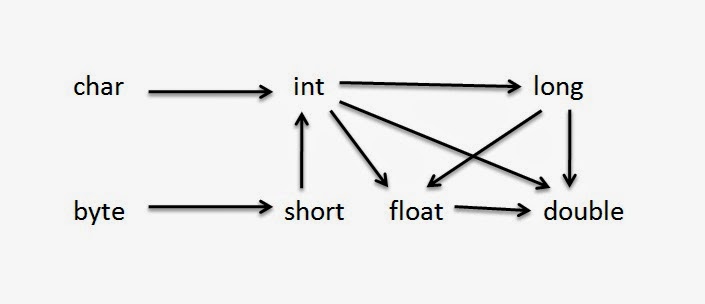
Note: Long takes 8 bytes while float takes 4 bytes, instead of that long (bigger type) can be converted to float (smaller type) which is an exception.

Thursday, February 12, 2015
JVM Java Virtual Machine Architecture and Structure
- JVM is responsible for taking .class file and converting that .class file in machine code instructions that can be executed by microprocessor.
- It’s not a machine, it’s a program.
- JVM verifies the code before execution (Sandbox Security).
- JVM is platform dependent and it is heart of Java language.

There are four phases of JVM
- Load Code
- Verify Code
- Execute Code
- Provide Runtime Environment
Overview of Java virtual machine (JVM) architecture and structure


Image Source: http://viralpatel.net/blogs/java-virtual-machine-an-inside-story/
Wednesday, February 11, 2015
Super Keyword in Java
Super refer to parent class. It holds the reference id of parent section of child class object. Observe below example.
class A
{
int x=10;
}
class B extends A
{
int x=20;
}

Here you can see that in child object, two separate sections are created namely parent section and child section. So super actually refer to parent section.
Use of Super Keyword in Java
There are three usage of super keyword in java.
- Access parent class instance variable.
- Invoke parent class method.
- Invoke parent class constructor.
Below program will show all the three usage of super keyword.
class parent
{
                int x=20;
                parent()
                {
                                System.out.println("Parent");
                }

                void show()
                {
                                System.out.println("Parent Show");
                }
}

class child extends parent
{
                int x=30;

                child()
                {
                                super();                                //invoke parent constructor
                }

                void show()
                {
                                System.out.println("Child Show");
                }

                void display()
                {
                                System.out.println(x);                   //print child x
                                System.out.println(super.x);      //print parent x

                                show();                                //invoke child show()
                                super.show();   //invoke parent show()
                }

                public static void main(String...s)
                {
                                child c=new child();
                                c.display();
                }
}

- Here both the classes have variable x and method show(). To access variable of child class we simply write x and to access variable of parent class we write super.x.
- Similarly, to invoke method of child we simple write show() and to invoke method of parent we write super.show(). In this way super is also used to remove the problem of method overriding.
- super() must be first line of the constructor. In above example we have written super() in first line of child class constructor to call parent class constructor.
- Super can’t be used in static method.
- By default super is first line of constructor. Super keyword and this keyword can’t be used together in constructor.
Tuesday, February 3, 2015
How to convert NetApp MOF file to Java Bean
.png)
NetApp Storage Device
SMI-S Support
Introduction:Initially, EMC is the leading market player providing remote infrastructure management devices. Later, NetApp came up with an idea to solve scratch level problems with storage devices. As the trend goes on, with the initiation of SNIA organization, Storage Management Initiative Specification (SMI-S) which provides vendor neutral platform to manage storage devices.

Procedure to manage NetApp storage device using SMI-S:
We need to install SMI-S Provider before we move on. We query this SMI-S Provider to get the data from the storage device. When we query the SMI-S Provider, it communicates with the storage device and gets required data for us. To query the SMI-S Provider we need to prepare Java Beans.
Questions been asked:
Is there any way to directly get Java Beans to support SMI-S for NetApp Storage Device?
How to query Google first to get the necessary help?
Answer is, looks like there are some handful resources but nothing of them makes me feel great.
Here is my effort to make this article a feel good factor for everyone.
Research and Development: (RnD)
I don’t think installing SMI-S Provider is a big deal. Just double click on the respective .exe file. Now, go to the installation directory and search for the zip folder named agent_mof. Extract it and go through the files content to analyze the device. You will find the .mof files there. You can generate beans from these .mof files.
Related Terminology: If you don’t want just skip it and directly enter into program
Cloud Service Provider (CSP):
Cloud Service Provider offers software or storage services. Those services are made available using public or private cloud.
Remote Infrastructure Management (RIM):
Remote Infrastructure Management is managing small to big devices remotely. It allows IT teams concentrate on strategic goals rather than managing IT operations
Storage Device:
As the name suggests, Storage Device is nothing but an equipment capable of storing huge information in it.
MOF File:
Managed Object Format file is the description for Java classes and instances. It is format Unicode or UTF-8.
Take for example, MOF File named ontap_battery.mof
Java Code to prepare Java class for this MOF file: JavaBeanMOF.java
package moftobean.netapp;
import java.io.BufferedReader;
import java.io.File;
import java.io.FileOutputStream;
import java.io.FileReader;
import java.util.HashMap;
import java.util.StringTokenizer;
public class JavaBeanMOF {
/**
* @param args
*/
public static void main(String[] args) {
try {
int i;
FileOutputStream fout = null;
File f2;
File f = new File("D:/SVNSTSWorkspace/NetApp Bean Generator/src/moftobean/netapp/ontap_battery.mof");
// folder name that the bean files will reside in a package
String namespace = "netapp";
FileReader fin = new FileReader(f);
BufferedReader bin = new BufferedReader(fin);
String line = null;
HashMap <string string=""> map = new HashMap<string string="">();
while((line = bin.readLine()) != null) {
if(line.trim().startsWith("class")) {
if(map.get(line) == null) {
map.put(line, line);
String cname = line.split(" ")[1];
String name = "D:/SVNSTSWorkspace/NetApp Bean Generator/src/moftobean/netapp/" + cname + ".java";
String packagePath = "package moftobean." + namespace + ";
";
f2 = new File(name);
fout = new FileOutputStream(f2);
fout.write(packagePath.getBytes());
i = 0;
if(line.contains(":")) {
//separate’s tokens based on space and colon
StringTokenizer st = new StringTokenizer(line,"[ :]");
String[] tokenlist = new String[st.countTokens()];
while (st.hasMoreTokens()) {
tokenlist[i] = st.nextToken();
i++;
}
String str1;
if(tokenlist[1].startsWith("ONTAP_") || tokenlist[3].startsWith("CIM_")) {
str1 = "public "+tokenlist[0]+" "+tokenlist[1]+" "+"extends"+" "+tokenlist[2]+" {";
System.out.println(str1);
fout.write((str1+"
").getBytes());
}
}
}
}
if(line.trim().endsWith(";") && !line.trim().startsWith("}")) {
String[] tokens = line.trim().split(" ");
if(tokens.length == 2) {
for(String token: tokens) {
if(token.trim().equalsIgnoreCase("string")) {
line = "String ";
} else if(token.trim().equalsIgnoreCase("uint16")) {
line = "UnsignedInteger16 " ;
}
// continue if you have more variable types in MOF file
if(token.trim().endsWith(";")) {
line = line+token;
}
}
}
System.out.println(line);
fout.write((line + "
").getBytes());
}
if(line.trim().startsWith("}") && line.trim().endsWith(";")) {
System.out.println("}");
fout.write(("}" + "
").getBytes());
}
}
bin.close();
} catch(Exception e) { e.printStackTrace(); }
}
}
Output: Two Java files are generated with the respective names.
ONTAP_Battery.java
package moftobean.netapp;
public class ONTAP_Battery extends CIM_Battery {
String SystemCreationClassName;
String SystemName;
String CreationClassName;
String DeviceID;
String Description;
String ElementName;
UnsignedInteger16 BatteryStatus;
}
ONTAP_StorageSystemBattery.java
package moftobean.netapp;
public class ONTAP_StorageSystemBattery extends CIM_SystemDevice {
ONTAP_StorageSystem REF GroupComponent;
ONTAP_Battery REF PartComponent;
}
Now, using the output files you can generate bean(setters and getters) using eclipse IDE.
The generated output files shows errors. No need worry about them. Just create CIM_SystemDevice and CIM_Battery as empty. They need to be there because “ONTAP_” classes extends “CIM_”
Classes.
And add cim-2.0.0.jar to the class path to resolve data type support errors.
This code is confined to the ONTAP_Battery.mof. Had to change to support all other .mof files if needed.
Variables uint6, string are same as UnsignedInteger16, String variables in Java language. Googling will get you complete list of mapping between CIM Element and Java Element. You will find them in oracle site.
MOF file is not provided here due to some reasons. You can work through the example as MOF files can be found in any windows system. Just type ext:mof in your search box.
In the above program, namespace variable value is initialized as netapp. For the NetApp Device, the namespace for the SMI-S provider is root/ontap. For your information ONTAP is the operating system name for the NetApp device.
Subscribe to:
Posts (Atom)