Showing posts with label another. Show all posts
Showing posts with label another. Show all posts
Sunday, March 1, 2015
St Patricks Day Craziness! and Another Freebie!
I have never been one to go all out for St. Patricks Day, but the other week our smartboard stopped working (temporarily, thank goodness), and I mentioned, "It must be a leprechaun!" Based on the reactions of the kids, I had to get into it this year!
I sent home a letter to parents asking them to have their children design a trap to catch a leprechaun. Heres what they came up with:

Arent they amazing?!
Well... tomorrow is the big day. We left our traps set up over the weekend and well get to see if we caught anything! Tomorrow morning, Im going to go in and mess up the classroom (turn the calendar backwards, mix up the days of the week, turn chairs and tables on their sides, move furniture around, etc.)
Im also going to have the kids go on a "Leprechaun Hunt!" Were going to go around the building following the clues to try to catch the leprechaun! While were out of out classroom, someone will be going to our room to place a pot of gold on my chair!
I know these clues are probably a bit late for you to use this year, but here they are anyway!


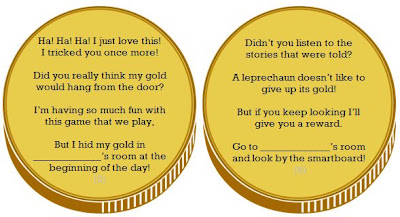

Click any of the pictures to download the clues!
If youre looking for other fun St. Patricks Day activities, I also have this cute digraphs game up on TPT. Check it out by clicking the picture below!

Read more »
I sent home a letter to parents asking them to have their children design a trap to catch a leprechaun. Heres what they came up with:

Arent they amazing?!
Well... tomorrow is the big day. We left our traps set up over the weekend and well get to see if we caught anything! Tomorrow morning, Im going to go in and mess up the classroom (turn the calendar backwards, mix up the days of the week, turn chairs and tables on their sides, move furniture around, etc.)
Im also going to have the kids go on a "Leprechaun Hunt!" Were going to go around the building following the clues to try to catch the leprechaun! While were out of out classroom, someone will be going to our room to place a pot of gold on my chair!
I know these clues are probably a bit late for you to use this year, but here they are anyway!


If youre looking for other fun St. Patricks Day activities, I also have this cute digraphs game up on TPT. Check it out by clicking the picture below!

Friday, February 27, 2015
Another Library Organization Update!
Every time I get requests for extra labels for my library organization set, I just love it because it makes the set an even better deal! Today, I added an additional 20 labels to my library set, bringing the set to a total of 132 labels.... for only $8. And, the best part is, you can get it for 28% now through May 8 with the TPT sale that is going on!


This new update added the following topics:
Authors and Series
Olivia
Jan Brett
Kevin Henkes
Franklin
ELA Topics
Rhyming
Reference
Classics
Mysteries
Social Studies
People & Places
Feelings
Growing Up
Presidents
Native Americans
Canada
Continents
Geography
General Topics
Science
Phonics
History
Technology
To see the full set of 132 labels, check out Teachers Pay Teachers!
Read more »
This new update added the following topics:
Authors and Series
Olivia
Jan Brett
Kevin Henkes
Franklin
ELA Topics
Rhyming
Reference
Classics
Mysteries
Social Studies
People & Places
Feelings
Growing Up
Presidents
Native Americans
Canada
Continents
Geography
General Topics
Science
Phonics
History
Technology
To see the full set of 132 labels, check out Teachers Pay Teachers!
Friday, February 13, 2015
Send One Dashboard selects input controls to another Dashboard selects values comes from first dashboard selects and sit in Dashboard 2 selects in Pentaho CDE
Hi Guys,
This post will talk about below scenario........
Scenario Explained:
When you navigate from one dashboard to another dashboard , in some cases you might need to pass the selected parameter values on Dashboard 1 to Dashboard 2 selects.
i.e., In simple terms, it is not the category names passing from any chart on performing click action but it is passing the input controls values from one dashboard selects to another dashboard selects. (Take input controls from DB-1 and make them to sit on input controls of DB-2 and then allow user to select other inputs if he/she wants on it)
This sample is developed on : C-Tools of 14.06.18.1 stable version of CDE,CDF,CDA with bootstrap supported.
You can perform below :
1) Default values for selects (dates and other drop downs)
2) Select user wished inputs in selects on Dashboard-1.
3) Provide a button/link to drill down to Dashboard-2 with the selected inputs on Dashboard-1.
4) On Dashboard-2 selects , the values will coming from Dashboard-1 will be placing.
5) Components(Charts and tables and etc) on Dashboard-2 will listen to these input selects.
6) Change the inputs to other values by selecting here on Dashboard-2 and corresponding components will listen to them again.
7) Link/Button to drill back to Home dashboard -It can be default stage of Dashboard-1 OR reversely can apply the same logic to place the changed values of DB-2 up on DB-1 selects.
In this example I have taken 3 inputs on Dashboard-1.
They are :
1) From Date
2) To Date and
3) ID
Dashboard -1 Development :
Step-1 : Lay Out
Below code is for : A panel with body and to for the place holder for lables and selects(Dates and others) and majorly for a Button(On which we are going to do some magic).
Row ->Column -> HTML
and the Bootstrap HTML code is :
<div class="col-md-12 ">
<div class="panel panel-primary">
<div class="panel-heading">
<h3 class="panel-title" id="DashboardName">Dashboard-1 Send the Selected Parameters to Dashbaord-2 Selects
<button onclick="sendParameters()" type="button" class="btn btn-default btn-xs pull-right">
Dashboard-2
</button>
</h3>
<div class="clearfix"></div>
</div>
<div class="panel-body">
<span class="labelcss"><b>From Date</b></span>
<span id="FromDateSelect"></span>
<span class="labelcss2"><b>To Date</b></span>
<span id="ToDateSelect"></span>
<span class="labelcss3"><b>ID</b></b></span>
<span id="IDSelect"></span>
</div>
</div>
</div>
Step 2: Creating parameters and Selects
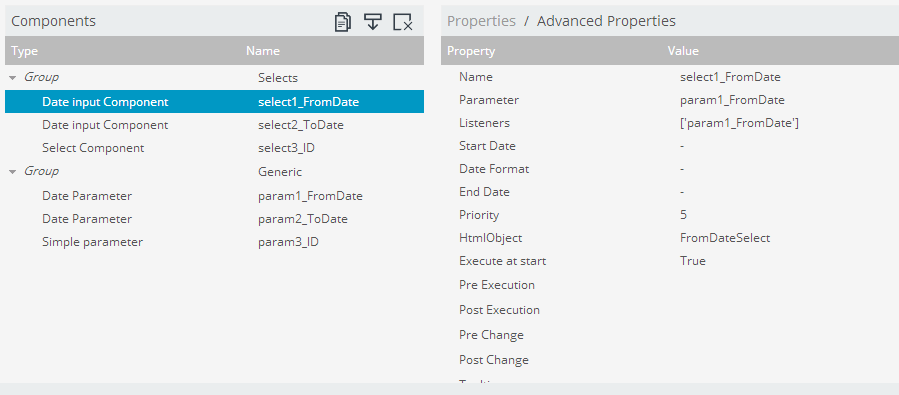
As shown in below figure create 3 parameters and selects for them.
i.e., param1_FromDate, param2_ToDate,param3_ID for parameters
and select1_FromDate, select2_ToDate and select3_ID for selects
Make the selects to listen to the associated parameters.
Note that in this example I have not taken any SQL for drop down selects instead created an array for drop down.
Step : 3
Have a preview of the dashboard once done with step 2 and you can observe there you will not be drill down action when clicking on button component.
Here, lets come back to Lay out section and add a Java Script resource.
Write below code in Java Script Code Snippet
function sendParameters(){
//Test whether your parameters holding the values in an alert message
alert("From Date="+param1_FromDate+"
"+"To Date="+param2_ToDate+"
"+"ID="+param3_ID);
//Perform drill down to 2nd dashboard when clicking on Button Component
var url=
http://localhost:8080/pentaho/api/repos/%3Apublic%3AExplore%3ACDEExploring%3ADevelopement%3AParametersPassingFromDB1SelectsToDB2Selects%3ADashboard2.wcdf/generatedContent;
//Open up 2nd dashboard with parameters passing along with URL
window.location=
url+?send1_FromDate=+param1_FromDate+&send2_ToDate=+param2_ToDate+&send3_ID=+param3_ID;
}
Dashboard -2 Development :
Development of this dashboard has to done separately to take its URL on Dashboard -1 java script
Develop your dashboard with the same input controls (Why to develop again ? Let us SAVE AS with other name and with few modifications - Remove script code, make button component URL in HTML script for HOME dashboard)
Add below script in Java Script Code snippet resource..
i.e., Capturing the values into parameters and internally the selects will take these input values..and later on Dashboard-2 user can select/change on input values on different selection.
param1_FromDate= Dashboards.getQueryParameter(send1_FromDate);
param2_ToDate= Dashboards.getQueryParameter(send2_ToDate);
param3_ID= Dashboards.getQueryParameter(send3_ID);
Dashboards.getQueryParameter(<parameterSenderStringFromDashboad1>) will capture the value from the URL and assign these values to respective parameters.

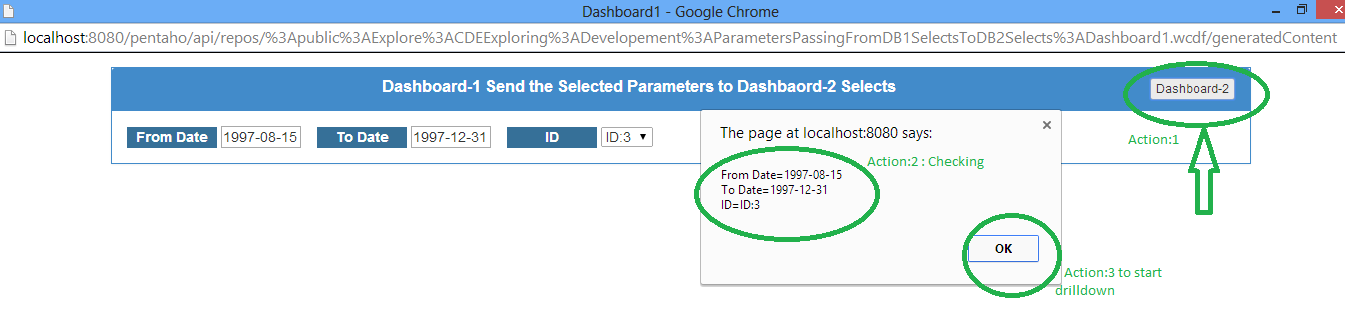
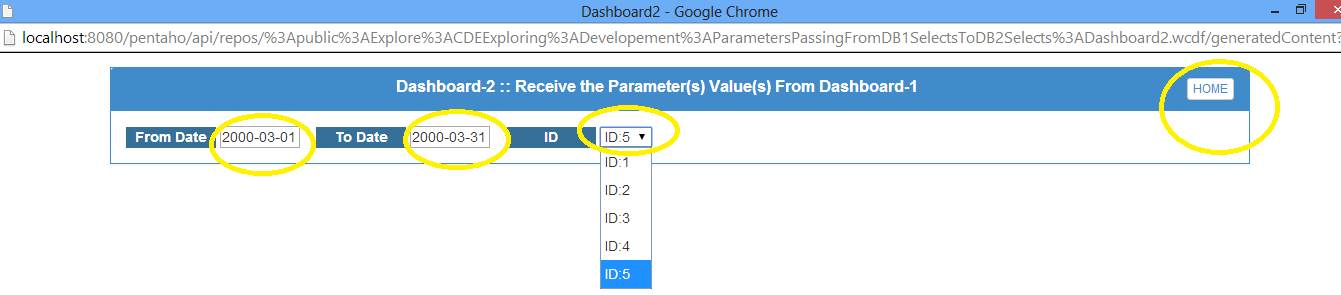
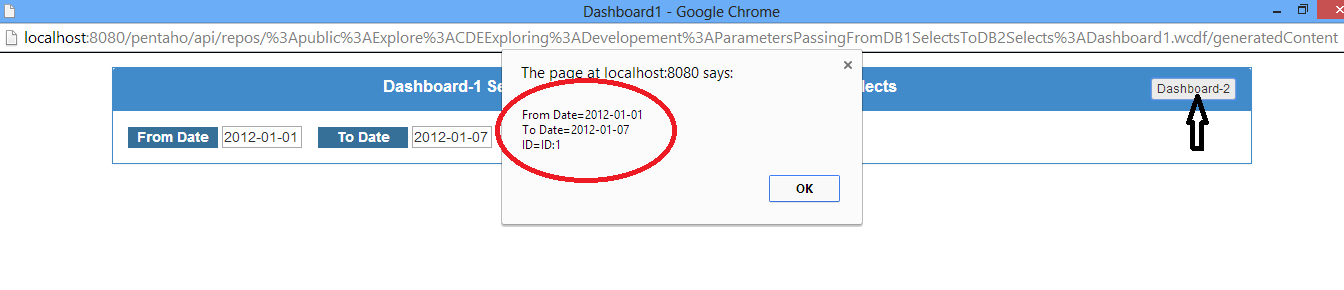 iii) Observe the values for select components on Dashboard-2 after clicking OK button.



Download the above qualified Example : Click Me
Download a quick simple example here : Click Me
Readers and community developers are encouraged to add your feedback ,suggestions and/or improvement of this post in comments section.
Sadakar Pochampalli
BI developer
(Jasper/Pentaho/Talend ETL)
Hyderabad, Telangana.
This post will talk about below scenario........
Scenario Explained:
When you navigate from one dashboard to another dashboard , in some cases you might need to pass the selected parameter values on Dashboard 1 to Dashboard 2 selects.
i.e., In simple terms, it is not the category names passing from any chart on performing click action but it is passing the input controls values from one dashboard selects to another dashboard selects. (Take input controls from DB-1 and make them to sit on input controls of DB-2 and then allow user to select other inputs if he/she wants on it)
This sample is developed on : C-Tools of 14.06.18.1 stable version of CDE,CDF,CDA with bootstrap supported.
You can perform below :
1) Default values for selects (dates and other drop downs)
2) Select user wished inputs in selects on Dashboard-1.
3) Provide a button/link to drill down to Dashboard-2 with the selected inputs on Dashboard-1.
4) On Dashboard-2 selects , the values will coming from Dashboard-1 will be placing.
5) Components(Charts and tables and etc) on Dashboard-2 will listen to these input selects.
6) Change the inputs to other values by selecting here on Dashboard-2 and corresponding components will listen to them again.
7) Link/Button to drill back to Home dashboard -It can be default stage of Dashboard-1 OR reversely can apply the same logic to place the changed values of DB-2 up on DB-1 selects.
In this example I have taken 3 inputs on Dashboard-1.
They are :
1) From Date
2) To Date and
3) ID
Dashboard -1 Development :
Step-1 : Lay Out
Below code is for : A panel with body and to for the place holder for lables and selects(Dates and others) and majorly for a Button(On which we are going to do some magic).
Row ->Column -> HTML
and the Bootstrap HTML code is :
<div class="col-md-12 ">
<div class="panel panel-primary">
<div class="panel-heading">
<h3 class="panel-title" id="DashboardName">Dashboard-1 Send the Selected Parameters to Dashbaord-2 Selects
<button onclick="sendParameters()" type="button" class="btn btn-default btn-xs pull-right">
Dashboard-2
</button>
</h3>
<div class="clearfix"></div>
</div>
<div class="panel-body">
<span class="labelcss"><b>From Date</b></span>
<span id="FromDateSelect"></span>
<span class="labelcss2"><b>To Date</b></span>
<span id="ToDateSelect"></span>
<span class="labelcss3"><b>ID</b></b></span>
<span id="IDSelect"></span>
</div>
</div>
</div>
Step 2: Creating parameters and Selects
As shown in below figure create 3 parameters and selects for them.
i.e., param1_FromDate, param2_ToDate,param3_ID for parameters
and select1_FromDate, select2_ToDate and select3_ID for selects
Make the selects to listen to the associated parameters.
Note that in this example I have not taken any SQL for drop down selects instead created an array for drop down.
Step : 3
Have a preview of the dashboard once done with step 2 and you can observe there you will not be drill down action when clicking on button component.
Here, lets come back to Lay out section and add a Java Script resource.
Write below code in Java Script Code Snippet
function sendParameters(){
//Test whether your parameters holding the values in an alert message
alert("From Date="+param1_FromDate+"
"+"To Date="+param2_ToDate+"
"+"ID="+param3_ID);
//Perform drill down to 2nd dashboard when clicking on Button Component
var url=
http://localhost:8080/pentaho/api/repos/%3Apublic%3AExplore%3ACDEExploring%3ADevelopement%3AParametersPassingFromDB1SelectsToDB2Selects%3ADashboard2.wcdf/generatedContent;
//Open up 2nd dashboard with parameters passing along with URL
window.location=
url+?send1_FromDate=+param1_FromDate+&send2_ToDate=+param2_ToDate+&send3_ID=+param3_ID;
}
Dashboard -2 Development :
Development of this dashboard has to done separately to take its URL on Dashboard -1 java script
Develop your dashboard with the same input controls (Why to develop again ? Let us SAVE AS with other name and with few modifications - Remove script code, make button component URL in HTML script for HOME dashboard)
Add below script in Java Script Code snippet resource..
i.e., Capturing the values into parameters and internally the selects will take these input values..and later on Dashboard-2 user can select/change on input values on different selection.
param1_FromDate= Dashboards.getQueryParameter(send1_FromDate);
param2_ToDate= Dashboards.getQueryParameter(send2_ToDate);
param3_ID= Dashboards.getQueryParameter(send3_ID);
Dashboards.getQueryParameter(<parameterSenderStringFromDashboad1>) will capture the value from the URL and assign these values to respective parameters.
Thats all, you are done....
Sample output Images :
CASE-1:
i). With Default Values On Dashboard-1
ii).Perform Click Action on Dashboard-2 Button and Test the select values in an Alert Message
iii) Observe the values for select components on Dashboard-2 after clicking OK button. CASE-II Images :
i) With User Selected Values On Dashboard-1
ii) Test with alert Message after performing click action on Dashboard-2 button
iii) Observe the values for select components on Dashboard-2 after clicking OK button.
iv) Make Other selections on Dashboard-2
Download a quick simple example here : Click Me
Readers and community developers are encouraged to add your feedback ,suggestions and/or improvement of this post in comments section.
Sadakar Pochampalli
BI developer
(Jasper/Pentaho/Talend ETL)
Hyderabad, Telangana.
Subscribe to:
Posts (Atom)