Showing posts with label comes. Show all posts
Showing posts with label comes. Show all posts
Friday, February 27, 2015
Move Aside TEDx Here Comes The Learning Innovation Talks LIT !

Alright, we should not talk big before things happen, but sometimes in life you get that feeling...
"THIS IS GOING TO WORK!"
ORIGIN
Somehow, I got that feeling when I joined iPTA-iPad (and Tablets) for Academicians Facebook group (invited by the electrifying Prof. Karim). Since late 2008, I have been dreaming (passively) about collaborating with a core group of passionate educators in Malaysia to really transform education for the better (without much luck!).
But, then I stumbled upon this Facebook group, and the rest is history in the making (Hopefully!). When I joined the group, they were passionately planning to conduct a TEDx session, but then I opened my big mouth (Devils Advocate)! Within a short period, the TEDx idea was history. TEDx is great, but it doesnt really fit into our mission.
While TEDx is often associated with Big Ideas and Changing the World, we are thinking about creating multiple venues (Face-to-face, Webinars, Second Life, etc.) for sharing learning stories on how to use technology (e.g. using iPad apps) to transform the way we learn and teach. Small ideas matter as much as big ideas! And importantly, you dont have to be out of this world to present. Everyone is welcome, as long as you think you have a learning innovation to share (small or big!).
Welcome to...
LEARNING INNOVATION TALKS
As a result, we used our collective intelligence to conceptualize Learning Innovation Talks.
Yes, I will be one of the presenters. Please come! If you dont, you will be able to view the recorded sessions later. So, either way we do hope our learning innovation sharing sessions reaches you.

LEARNING INNOVATION CIRCLE
Learning Innovation Talks is the first learning gem to spark out of this brand new Learning Innovation Circle. Confusing? Come and join the Learning Innovation Circle!
I got this fuzzy little feeling that this group is going to conceptualize and implement some pretty awesome initiatives in the coming months (and years), so why not be part of history in the making... Everyone is welcome to join... :)

Wednesday, February 18, 2015
Microsoft skips windows 9 and here comes WINDOWS 10!!!

Microsoft officially unveiled Windows 10 this morning, and the company is planning to distribute a Technical Preview of the new operating system tomorrow. At Microsofts event today there were a number of machines running the Windows 10 Technical Preview, and I got an opportunity to briefly explore the new OS. While Microsoft pushed hard with touch on Windows 8, Windows 10 is the complete opposite. If you mouse into the corners to find the tricky Charms Bar they no longer trigger and frustrate. Instead, youre greeted with the familiar Windows desktop and Start Menu from the moment you use Windows 10. Its Windows 7 right now and very early in its development, but it has some interesting improvements waiting inside.
THE START MENU RETURNS TO FOCUS WINDOWS ON THE DESKTOP
The Start Menu is the most obvious addition. Just like in Windows 7 and other versions before it, the Start Menu largely acts in the same way. Microsoft has done a u-turn here, but its also considered the way it can modernize its Start Menu and it appears to have paid off. Its customizable enough that you can resize it, pin traditional and modern apps, or simply have it match the color of your desktop wallpaper. These hints of Windows 8 shine through directly in the Windows 10 Start Menu, and although the overall interface feels like the Windows desktop, the Start Menu feels truly new and yet familiar at the same time.

AN OS X-LIKE EXPOSE FOR WINDOWS USERS
Another big new user interface feature is a new Task View button that sits on the taskbar. It looks fairly innocuous, but when you trigger it youre thrown into a multitasking view thats very similar to Apples OS X Expose feature. Multiple desktops are available from here, and you can switch between them with ease to manage multiple apps across different workspaces. Its the feature Windows has always needed, and Microsoft has borrowed elements from rival operating systems like OS X and Linux / Unix to really introduce this in Windows 10. But instead of making it identical to the competition, Microsoft has added in its productivity-focused snap views into Task View. You can snap apps in the same way you do in Windows 7 or Windows 8, and a new prompt will suggest apps that can be snapped alongside each other or windowed in complex ways. It appears to work well, even if theres a slight learning curve youll need to get over to make the most out of it. I did notice that if you have apps running in a separate desktop space then it can get confusing to bring them to a different active desktop space, but this is an early build of Windows 10 and theres a long way to go until its ready late next year.
HINTS SHOW FUTURE UI CHANGES ARE ON THE WAY
Elsewhere, there are hints that Microsoft will revamp the user interface more. Theres subtle drop shadows around apps, and a new bar on the taskbar that indicates what apps are active. Theres also new icons for File Explorer and Desktop, but you can imagine that Microsoft will overhaul all of its icons to be more modern with Windows 10. Another big change is the ability to run universal modern apps in windows on the desktop. Microsoft demonstrated this originally at Build, but using it in practice just feels totally natural, as if it should have always been this way. You can snap these apps alongside each other, and they also seem to resize fairly well to make them a lot more usable for mouse and keyboard users.
Windows 10 might be fairly basic right now, but the signs are there that Microsoft understands its audience of Windows users. Microsofts Joe Belfiore took the time to demonstrate a command prompt refresh that finally brings the ability to copy and paste directories with the keyboard. Its the most minor and geeky feature youd ever expect in a Microsoft keynote, but it demonstrates that the company appears to be serious about overhauling Windows fully with Windows 10. With regular updates planned over the coming months before release, expect to see Windows 10 change in unexpected and welcomed ways. It might look like Windows 10 is just another Windows 7, but hopefully once the company is done tidying up the Windows desktop it will look and feel like a lot more.

Although the windows 10 technical preview is here for people who would like to grasp a feel of what it really entails, the original version is still estimated to be out roughly around mid next year, that is 2015.
Friday, February 13, 2015
Send One Dashboard selects input controls to another Dashboard selects values comes from first dashboard selects and sit in Dashboard 2 selects in Pentaho CDE
Hi Guys,
This post will talk about below scenario........
Scenario Explained:
When you navigate from one dashboard to another dashboard , in some cases you might need to pass the selected parameter values on Dashboard 1 to Dashboard 2 selects.
i.e., In simple terms, it is not the category names passing from any chart on performing click action but it is passing the input controls values from one dashboard selects to another dashboard selects. (Take input controls from DB-1 and make them to sit on input controls of DB-2 and then allow user to select other inputs if he/she wants on it)
This sample is developed on : C-Tools of 14.06.18.1 stable version of CDE,CDF,CDA with bootstrap supported.
You can perform below :
1) Default values for selects (dates and other drop downs)
2) Select user wished inputs in selects on Dashboard-1.
3) Provide a button/link to drill down to Dashboard-2 with the selected inputs on Dashboard-1.
4) On Dashboard-2 selects , the values will coming from Dashboard-1 will be placing.
5) Components(Charts and tables and etc) on Dashboard-2 will listen to these input selects.
6) Change the inputs to other values by selecting here on Dashboard-2 and corresponding components will listen to them again.
7) Link/Button to drill back to Home dashboard -It can be default stage of Dashboard-1 OR reversely can apply the same logic to place the changed values of DB-2 up on DB-1 selects.
In this example I have taken 3 inputs on Dashboard-1.
They are :
1) From Date
2) To Date and
3) ID
Dashboard -1 Development :
Step-1 : Lay Out
Below code is for : A panel with body and to for the place holder for lables and selects(Dates and others) and majorly for a Button(On which we are going to do some magic).
Row ->Column -> HTML
and the Bootstrap HTML code is :
<div class="col-md-12 ">
<div class="panel panel-primary">
<div class="panel-heading">
<h3 class="panel-title" id="DashboardName">Dashboard-1 Send the Selected Parameters to Dashbaord-2 Selects
<button onclick="sendParameters()" type="button" class="btn btn-default btn-xs pull-right">
Dashboard-2
</button>
</h3>
<div class="clearfix"></div>
</div>
<div class="panel-body">
<span class="labelcss"><b>From Date</b></span>
<span id="FromDateSelect"></span>
<span class="labelcss2"><b>To Date</b></span>
<span id="ToDateSelect"></span>
<span class="labelcss3"><b>ID</b></b></span>
<span id="IDSelect"></span>
</div>
</div>
</div>
Step 2: Creating parameters and Selects
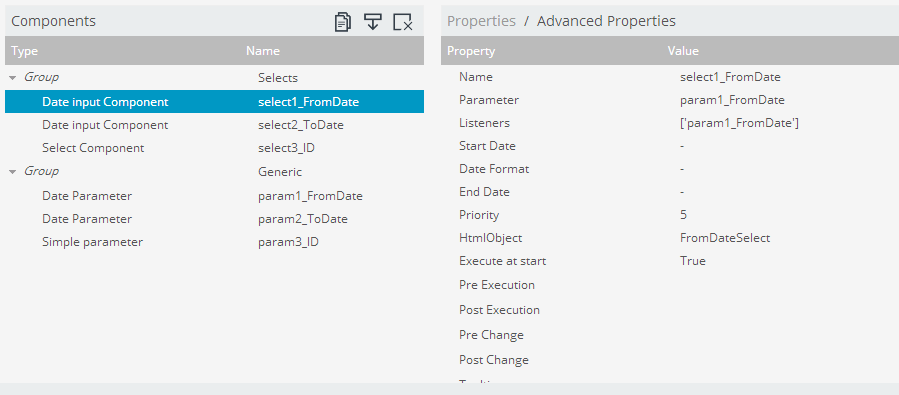
As shown in below figure create 3 parameters and selects for them.
i.e., param1_FromDate, param2_ToDate,param3_ID for parameters
and select1_FromDate, select2_ToDate and select3_ID for selects
Make the selects to listen to the associated parameters.
Note that in this example I have not taken any SQL for drop down selects instead created an array for drop down.
Step : 3
Have a preview of the dashboard once done with step 2 and you can observe there you will not be drill down action when clicking on button component.
Here, lets come back to Lay out section and add a Java Script resource.
Write below code in Java Script Code Snippet
function sendParameters(){
//Test whether your parameters holding the values in an alert message
alert("From Date="+param1_FromDate+"
"+"To Date="+param2_ToDate+"
"+"ID="+param3_ID);
//Perform drill down to 2nd dashboard when clicking on Button Component
var url=
http://localhost:8080/pentaho/api/repos/%3Apublic%3AExplore%3ACDEExploring%3ADevelopement%3AParametersPassingFromDB1SelectsToDB2Selects%3ADashboard2.wcdf/generatedContent;
//Open up 2nd dashboard with parameters passing along with URL
window.location=
url+?send1_FromDate=+param1_FromDate+&send2_ToDate=+param2_ToDate+&send3_ID=+param3_ID;
}
Dashboard -2 Development :
Development of this dashboard has to done separately to take its URL on Dashboard -1 java script
Develop your dashboard with the same input controls (Why to develop again ? Let us SAVE AS with other name and with few modifications - Remove script code, make button component URL in HTML script for HOME dashboard)
Add below script in Java Script Code snippet resource..
i.e., Capturing the values into parameters and internally the selects will take these input values..and later on Dashboard-2 user can select/change on input values on different selection.
param1_FromDate= Dashboards.getQueryParameter(send1_FromDate);
param2_ToDate= Dashboards.getQueryParameter(send2_ToDate);
param3_ID= Dashboards.getQueryParameter(send3_ID);
Dashboards.getQueryParameter(<parameterSenderStringFromDashboad1>) will capture the value from the URL and assign these values to respective parameters.

 iii) Observe the values for select components on Dashboard-2 after clicking OK button.


Download the above qualified Example : Click Me
Download a quick simple example here : Click Me
Readers and community developers are encouraged to add your feedback ,suggestions and/or improvement of this post in comments section.
Sadakar Pochampalli
BI developer
(Jasper/Pentaho/Talend ETL)
Hyderabad, Telangana.
This post will talk about below scenario........
Scenario Explained:
When you navigate from one dashboard to another dashboard , in some cases you might need to pass the selected parameter values on Dashboard 1 to Dashboard 2 selects.
i.e., In simple terms, it is not the category names passing from any chart on performing click action but it is passing the input controls values from one dashboard selects to another dashboard selects. (Take input controls from DB-1 and make them to sit on input controls of DB-2 and then allow user to select other inputs if he/she wants on it)
This sample is developed on : C-Tools of 14.06.18.1 stable version of CDE,CDF,CDA with bootstrap supported.
You can perform below :
1) Default values for selects (dates and other drop downs)
2) Select user wished inputs in selects on Dashboard-1.
3) Provide a button/link to drill down to Dashboard-2 with the selected inputs on Dashboard-1.
4) On Dashboard-2 selects , the values will coming from Dashboard-1 will be placing.
5) Components(Charts and tables and etc) on Dashboard-2 will listen to these input selects.
6) Change the inputs to other values by selecting here on Dashboard-2 and corresponding components will listen to them again.
7) Link/Button to drill back to Home dashboard -It can be default stage of Dashboard-1 OR reversely can apply the same logic to place the changed values of DB-2 up on DB-1 selects.
In this example I have taken 3 inputs on Dashboard-1.
They are :
1) From Date
2) To Date and
3) ID
Dashboard -1 Development :
Step-1 : Lay Out
Below code is for : A panel with body and to for the place holder for lables and selects(Dates and others) and majorly for a Button(On which we are going to do some magic).
Row ->Column -> HTML
and the Bootstrap HTML code is :
<div class="col-md-12 ">
<div class="panel panel-primary">
<div class="panel-heading">
<h3 class="panel-title" id="DashboardName">Dashboard-1 Send the Selected Parameters to Dashbaord-2 Selects
<button onclick="sendParameters()" type="button" class="btn btn-default btn-xs pull-right">
Dashboard-2
</button>
</h3>
<div class="clearfix"></div>
</div>
<div class="panel-body">
<span class="labelcss"><b>From Date</b></span>
<span id="FromDateSelect"></span>
<span class="labelcss2"><b>To Date</b></span>
<span id="ToDateSelect"></span>
<span class="labelcss3"><b>ID</b></b></span>
<span id="IDSelect"></span>
</div>
</div>
</div>
Step 2: Creating parameters and Selects
As shown in below figure create 3 parameters and selects for them.
i.e., param1_FromDate, param2_ToDate,param3_ID for parameters
and select1_FromDate, select2_ToDate and select3_ID for selects
Make the selects to listen to the associated parameters.
Note that in this example I have not taken any SQL for drop down selects instead created an array for drop down.
Step : 3
Have a preview of the dashboard once done with step 2 and you can observe there you will not be drill down action when clicking on button component.
Here, lets come back to Lay out section and add a Java Script resource.
Write below code in Java Script Code Snippet
function sendParameters(){
//Test whether your parameters holding the values in an alert message
alert("From Date="+param1_FromDate+"
"+"To Date="+param2_ToDate+"
"+"ID="+param3_ID);
//Perform drill down to 2nd dashboard when clicking on Button Component
var url=
http://localhost:8080/pentaho/api/repos/%3Apublic%3AExplore%3ACDEExploring%3ADevelopement%3AParametersPassingFromDB1SelectsToDB2Selects%3ADashboard2.wcdf/generatedContent;
//Open up 2nd dashboard with parameters passing along with URL
window.location=
url+?send1_FromDate=+param1_FromDate+&send2_ToDate=+param2_ToDate+&send3_ID=+param3_ID;
}
Dashboard -2 Development :
Development of this dashboard has to done separately to take its URL on Dashboard -1 java script
Develop your dashboard with the same input controls (Why to develop again ? Let us SAVE AS with other name and with few modifications - Remove script code, make button component URL in HTML script for HOME dashboard)
Add below script in Java Script Code snippet resource..
i.e., Capturing the values into parameters and internally the selects will take these input values..and later on Dashboard-2 user can select/change on input values on different selection.
param1_FromDate= Dashboards.getQueryParameter(send1_FromDate);
param2_ToDate= Dashboards.getQueryParameter(send2_ToDate);
param3_ID= Dashboards.getQueryParameter(send3_ID);
Dashboards.getQueryParameter(<parameterSenderStringFromDashboad1>) will capture the value from the URL and assign these values to respective parameters.
Thats all, you are done....
Sample output Images :
CASE-1:
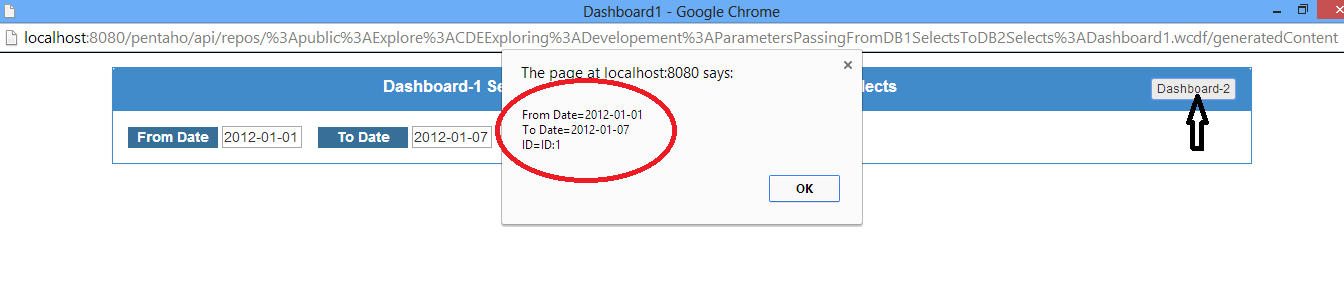
i). With Default Values On Dashboard-1
ii).Perform Click Action on Dashboard-2 Button and Test the select values in an Alert Message
iii) Observe the values for select components on Dashboard-2 after clicking OK button. CASE-II Images :
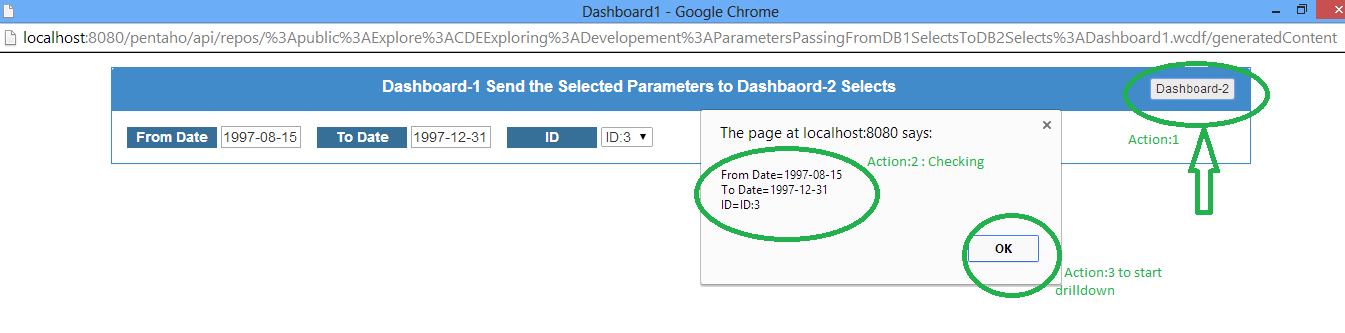
i) With User Selected Values On Dashboard-1
ii) Test with alert Message after performing click action on Dashboard-2 button
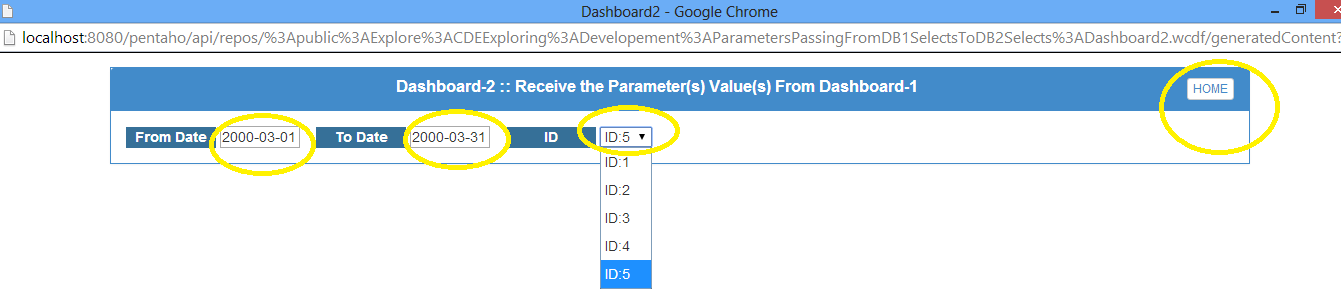
iii) Observe the values for select components on Dashboard-2 after clicking OK button.
iv) Make Other selections on Dashboard-2
Download a quick simple example here : Click Me
Readers and community developers are encouraged to add your feedback ,suggestions and/or improvement of this post in comments section.
Sadakar Pochampalli
BI developer
(Jasper/Pentaho/Talend ETL)
Hyderabad, Telangana.
Subscribe to:
Posts (Atom)