Showing posts with label pentaho. Show all posts
Showing posts with label pentaho. Show all posts
Tuesday, February 17, 2015
Cascading multi select parameters example in pentaho CDE
Hello Guys
You will learn how to do cascading with multi select components in pentaho CDE . There is another post on the same topic in this site which was a basic one.
In this you will find the implementation of
1) Custom parameters & default values
2) Multi select input controls cascading.
3) Fixed height & back ground color for input controls.
Final Look of the cascading parameter :
 One of the Layouts design for selects (Country select place holder) [Not the Country label place]
Custom Parameters :
param1 for country
Default value in Javascript code ["US","Canada"]

param2 for state
Default value in Javascript code ["BC","WA"]

param3 for city

select1 for country

select2 for state


select2 parameters (at only parameter place give param2)


select3 parameters (at only parameter place give param3)

Query 1 : country query (SELECT DISTINCT country FROM customer)

Query2 : state query
SELECT DISTINCT state_province FROM customer WHERE country IN (${param1})
NOTE : for multiple selection parameter name should be given with in bracket i.e., with in ()


Query 3 : city query
SELECT
DISTINCT city FROM customer
WHERE
(
country IN (${param1})
AND
state_province IN(${param2})
)
NOTE : for multiple selection parameter name should be given with in bracket i.e., with in ()


OUTPUT : Image 1
Download the example : Click Me - Cascading multi select and HTML tabs examples
:-) Sadakar :-)

Saturday, February 14, 2015
Pentaho CDE Webdeatils example Dashboards list Reference
1) Web details site
http://www.webdetails.pt/
2) Example -1 ( BigWire less Example Dashboard)
http://demo.webdetails.org:8080/pentaho/content/pentaho-cdf-dd/Render?solution=ClearWireless&path=&file=maindashboard.wcdf
3) Example-2 (Overview Dashboard)
http://www.webdetails.pt/pentaho/content/pentaho-cdf-dd/Render?solution=Demo&path=%2FDashboards&file=Content01.wcdf
4) Example-3(Grow Mozilla)
https://metrics.mozilla.com/data/content/pentaho-cdf-dd/Render?solution=metrics2&path=%2FgetInvolved&file=getInvolved.wcdf
5) Example-4 (The Fighter Shoot out Dashbard)
http://www.webdetails.pt/pentaho/content/pentaho-cdf-dd/Render?solution=PublicDemo&path=%2FTieDemo&file=TieDemo.wcdf
6) Example-5(SyncDemo1)
http://www.webdetails.pt/pentaho/content/pentaho-cdf-dd/Render?solution=PublicDemo&path=%2FSyncDemo1&file=SyncDemo1.wcdf
7) Example-6(Lekaemia & Lymphoma Research)
http://demo.webdetails.org:8080/pentaho/content/pentaho-cdf-dd/Render?solution=Leukaemia&path=&file=leukaemia.wcdf
8) Example-7 (Leading Product Lines (Pivot Table))
http://www.pentaho.com/pentaho/mantle/home/content/getting_started_launch.html?selectedTab=tab2&selectedContentIndex=0
You need to login to the demo site and then have to check this example
Image found for this example

Why all these examples here ?
You can open this examples in Mozilla browser and debug the css, java script, jquery for your requirements and of course these examples will make your job easy as you have some example ready with you.
Friday, February 13, 2015
Send One Dashboard selects input controls to another Dashboard selects values comes from first dashboard selects and sit in Dashboard 2 selects in Pentaho CDE
Hi Guys,
This post will talk about below scenario........
Scenario Explained:
When you navigate from one dashboard to another dashboard , in some cases you might need to pass the selected parameter values on Dashboard 1 to Dashboard 2 selects.
i.e., In simple terms, it is not the category names passing from any chart on performing click action but it is passing the input controls values from one dashboard selects to another dashboard selects. (Take input controls from DB-1 and make them to sit on input controls of DB-2 and then allow user to select other inputs if he/she wants on it)
This sample is developed on : C-Tools of 14.06.18.1 stable version of CDE,CDF,CDA with bootstrap supported.
You can perform below :
1) Default values for selects (dates and other drop downs)
2) Select user wished inputs in selects on Dashboard-1.
3) Provide a button/link to drill down to Dashboard-2 with the selected inputs on Dashboard-1.
4) On Dashboard-2 selects , the values will coming from Dashboard-1 will be placing.
5) Components(Charts and tables and etc) on Dashboard-2 will listen to these input selects.
6) Change the inputs to other values by selecting here on Dashboard-2 and corresponding components will listen to them again.
7) Link/Button to drill back to Home dashboard -It can be default stage of Dashboard-1 OR reversely can apply the same logic to place the changed values of DB-2 up on DB-1 selects.
In this example I have taken 3 inputs on Dashboard-1.
They are :
1) From Date
2) To Date and
3) ID
Dashboard -1 Development :
Step-1 : Lay Out
Below code is for : A panel with body and to for the place holder for lables and selects(Dates and others) and majorly for a Button(On which we are going to do some magic).
Row ->Column -> HTML
and the Bootstrap HTML code is :
<div class="col-md-12 ">
<div class="panel panel-primary">
<div class="panel-heading">
<h3 class="panel-title" id="DashboardName">Dashboard-1 Send the Selected Parameters to Dashbaord-2 Selects
<button onclick="sendParameters()" type="button" class="btn btn-default btn-xs pull-right">
Dashboard-2
</button>
</h3>
<div class="clearfix"></div>
</div>
<div class="panel-body">
<span class="labelcss"><b>From Date</b></span>
<span id="FromDateSelect"></span>
<span class="labelcss2"><b>To Date</b></span>
<span id="ToDateSelect"></span>
<span class="labelcss3"><b>ID</b></b></span>
<span id="IDSelect"></span>
</div>
</div>
</div>
Step 2: Creating parameters and Selects
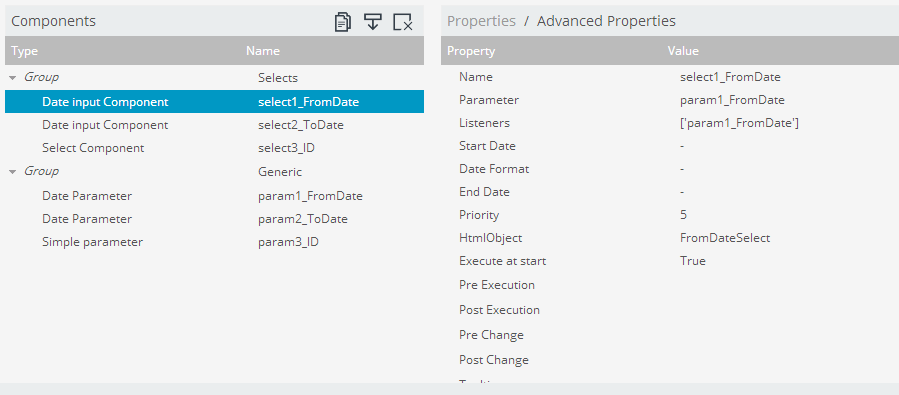
As shown in below figure create 3 parameters and selects for them.
i.e., param1_FromDate, param2_ToDate,param3_ID for parameters
and select1_FromDate, select2_ToDate and select3_ID for selects
Make the selects to listen to the associated parameters.
Note that in this example I have not taken any SQL for drop down selects instead created an array for drop down.
Step : 3
Have a preview of the dashboard once done with step 2 and you can observe there you will not be drill down action when clicking on button component.
Here, lets come back to Lay out section and add a Java Script resource.
Write below code in Java Script Code Snippet
function sendParameters(){
//Test whether your parameters holding the values in an alert message
alert("From Date="+param1_FromDate+"
"+"To Date="+param2_ToDate+"
"+"ID="+param3_ID);
//Perform drill down to 2nd dashboard when clicking on Button Component
var url=
http://localhost:8080/pentaho/api/repos/%3Apublic%3AExplore%3ACDEExploring%3ADevelopement%3AParametersPassingFromDB1SelectsToDB2Selects%3ADashboard2.wcdf/generatedContent;
//Open up 2nd dashboard with parameters passing along with URL
window.location=
url+?send1_FromDate=+param1_FromDate+&send2_ToDate=+param2_ToDate+&send3_ID=+param3_ID;
}
Dashboard -2 Development :
Development of this dashboard has to done separately to take its URL on Dashboard -1 java script
Develop your dashboard with the same input controls (Why to develop again ? Let us SAVE AS with other name and with few modifications - Remove script code, make button component URL in HTML script for HOME dashboard)
Add below script in Java Script Code snippet resource..
i.e., Capturing the values into parameters and internally the selects will take these input values..and later on Dashboard-2 user can select/change on input values on different selection.
param1_FromDate= Dashboards.getQueryParameter(send1_FromDate);
param2_ToDate= Dashboards.getQueryParameter(send2_ToDate);
param3_ID= Dashboards.getQueryParameter(send3_ID);
Dashboards.getQueryParameter(<parameterSenderStringFromDashboad1>) will capture the value from the URL and assign these values to respective parameters.

 iii) Observe the values for select components on Dashboard-2 after clicking OK button.


Download the above qualified Example : Click Me
Download a quick simple example here : Click Me
Readers and community developers are encouraged to add your feedback ,suggestions and/or improvement of this post in comments section.
Sadakar Pochampalli
BI developer
(Jasper/Pentaho/Talend ETL)
Hyderabad, Telangana.
This post will talk about below scenario........
Scenario Explained:
When you navigate from one dashboard to another dashboard , in some cases you might need to pass the selected parameter values on Dashboard 1 to Dashboard 2 selects.
i.e., In simple terms, it is not the category names passing from any chart on performing click action but it is passing the input controls values from one dashboard selects to another dashboard selects. (Take input controls from DB-1 and make them to sit on input controls of DB-2 and then allow user to select other inputs if he/she wants on it)
This sample is developed on : C-Tools of 14.06.18.1 stable version of CDE,CDF,CDA with bootstrap supported.
You can perform below :
1) Default values for selects (dates and other drop downs)
2) Select user wished inputs in selects on Dashboard-1.
3) Provide a button/link to drill down to Dashboard-2 with the selected inputs on Dashboard-1.
4) On Dashboard-2 selects , the values will coming from Dashboard-1 will be placing.
5) Components(Charts and tables and etc) on Dashboard-2 will listen to these input selects.
6) Change the inputs to other values by selecting here on Dashboard-2 and corresponding components will listen to them again.
7) Link/Button to drill back to Home dashboard -It can be default stage of Dashboard-1 OR reversely can apply the same logic to place the changed values of DB-2 up on DB-1 selects.
In this example I have taken 3 inputs on Dashboard-1.
They are :
1) From Date
2) To Date and
3) ID
Dashboard -1 Development :
Step-1 : Lay Out
Below code is for : A panel with body and to for the place holder for lables and selects(Dates and others) and majorly for a Button(On which we are going to do some magic).
Row ->Column -> HTML
and the Bootstrap HTML code is :
<div class="col-md-12 ">
<div class="panel panel-primary">
<div class="panel-heading">
<h3 class="panel-title" id="DashboardName">Dashboard-1 Send the Selected Parameters to Dashbaord-2 Selects
<button onclick="sendParameters()" type="button" class="btn btn-default btn-xs pull-right">
Dashboard-2
</button>
</h3>
<div class="clearfix"></div>
</div>
<div class="panel-body">
<span class="labelcss"><b>From Date</b></span>
<span id="FromDateSelect"></span>
<span class="labelcss2"><b>To Date</b></span>
<span id="ToDateSelect"></span>
<span class="labelcss3"><b>ID</b></b></span>
<span id="IDSelect"></span>
</div>
</div>
</div>
Step 2: Creating parameters and Selects
As shown in below figure create 3 parameters and selects for them.
i.e., param1_FromDate, param2_ToDate,param3_ID for parameters
and select1_FromDate, select2_ToDate and select3_ID for selects
Make the selects to listen to the associated parameters.
Note that in this example I have not taken any SQL for drop down selects instead created an array for drop down.
Step : 3
Have a preview of the dashboard once done with step 2 and you can observe there you will not be drill down action when clicking on button component.
Here, lets come back to Lay out section and add a Java Script resource.
Write below code in Java Script Code Snippet
function sendParameters(){
//Test whether your parameters holding the values in an alert message
alert("From Date="+param1_FromDate+"
"+"To Date="+param2_ToDate+"
"+"ID="+param3_ID);
//Perform drill down to 2nd dashboard when clicking on Button Component
var url=
http://localhost:8080/pentaho/api/repos/%3Apublic%3AExplore%3ACDEExploring%3ADevelopement%3AParametersPassingFromDB1SelectsToDB2Selects%3ADashboard2.wcdf/generatedContent;
//Open up 2nd dashboard with parameters passing along with URL
window.location=
url+?send1_FromDate=+param1_FromDate+&send2_ToDate=+param2_ToDate+&send3_ID=+param3_ID;
}
Dashboard -2 Development :
Development of this dashboard has to done separately to take its URL on Dashboard -1 java script
Develop your dashboard with the same input controls (Why to develop again ? Let us SAVE AS with other name and with few modifications - Remove script code, make button component URL in HTML script for HOME dashboard)
Add below script in Java Script Code snippet resource..
i.e., Capturing the values into parameters and internally the selects will take these input values..and later on Dashboard-2 user can select/change on input values on different selection.
param1_FromDate= Dashboards.getQueryParameter(send1_FromDate);
param2_ToDate= Dashboards.getQueryParameter(send2_ToDate);
param3_ID= Dashboards.getQueryParameter(send3_ID);
Dashboards.getQueryParameter(<parameterSenderStringFromDashboad1>) will capture the value from the URL and assign these values to respective parameters.
Thats all, you are done....
Sample output Images :
CASE-1:
i). With Default Values On Dashboard-1
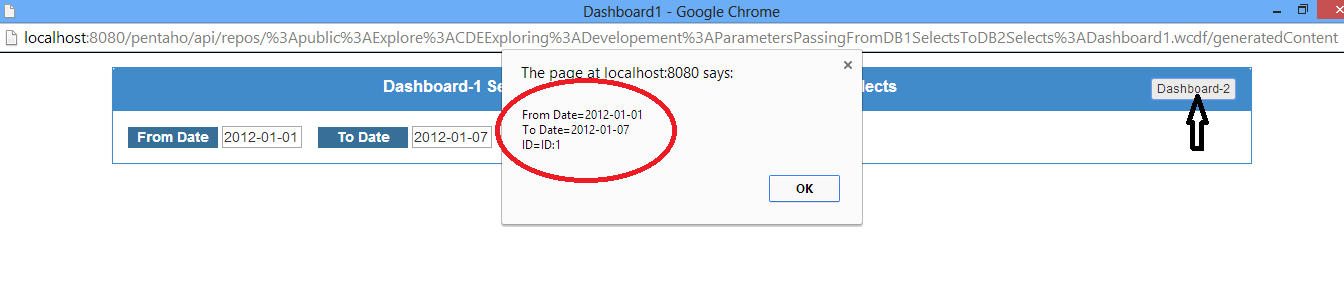
ii).Perform Click Action on Dashboard-2 Button and Test the select values in an Alert Message
iii) Observe the values for select components on Dashboard-2 after clicking OK button. CASE-II Images :
i) With User Selected Values On Dashboard-1
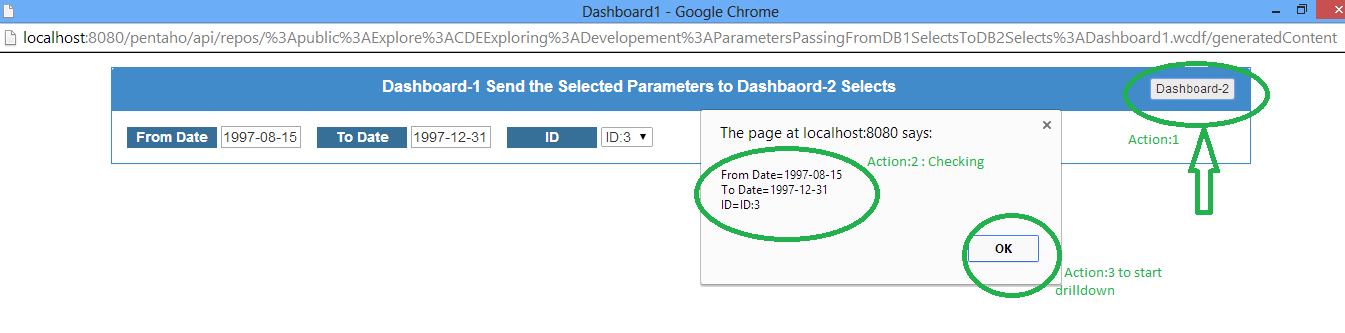
ii) Test with alert Message after performing click action on Dashboard-2 button
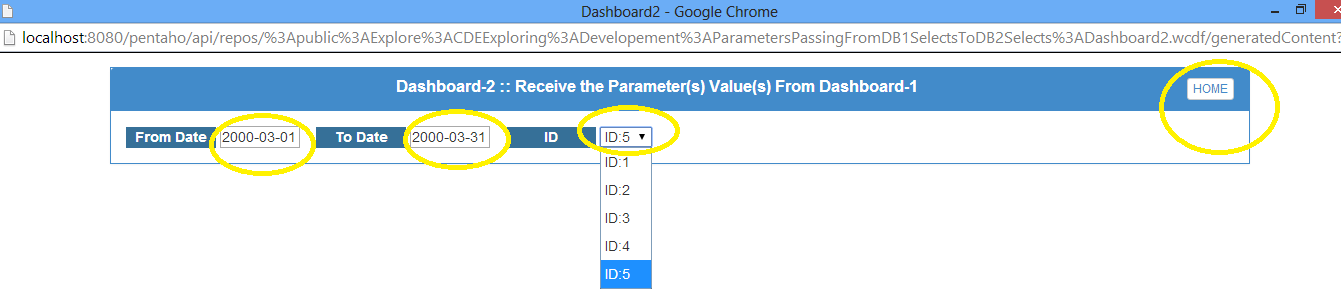
iii) Observe the values for select components on Dashboard-2 after clicking OK button.
iv) Make Other selections on Dashboard-2
Download a quick simple example here : Click Me
Readers and community developers are encouraged to add your feedback ,suggestions and/or improvement of this post in comments section.
Sadakar Pochampalli
BI developer
(Jasper/Pentaho/Talend ETL)
Hyderabad, Telangana.
DateRange Component Example in pentaho CDE
Hi Guys,
A small work out on Date Range component in pentaho CDE.
SUM(sf7.store_sales) "Store Sales",
--SUM(sf7.store_cost) "Store Cost",
SUM(sf7.unit_sales) "Unit Sales"
FROM sales_fact_1997 sf7
INNER JOIN product p ON sf7.product_id=p.product_id
INNER JOIN time_by_day t ON sf7.time_id=t.time_id
INNER JOIN customer c ON sf7.customer_id=c.customer_id
WHERE
to_char(t.the_date,YYYY-MM-DD) >= ${param1_FromDate}
AND to_char(t.the_date, YYYY-MM-DD) <= ${param2_ToDate}
AND c.country=${param3_Country} AND c.state_province=${param4_State}
GROUP BY p.brand_name
ORDER BY 2 DESC,3 DESC
limit 5


Observations:
My default values for start date and end date are : 2012-01-01 and 2012-01-07
Test 1 : Default values

Test 2 : Today


In this way you can make use of Date Range Component.
A small work out on Date Range component in pentaho CDE.
- As shown in images create 2 parameters of "Date Parameters" type from Generic section of Components Panel.
- lets say one for start date and other for to date.
- Give default values for both of them.
- Click on "Date Range input componet" from selects section of Components panel.
- These date parameters you have to use in your query and the query dates should be converted to String type before you use.
- i.e., Sample query written in postgresql(foodmart db of jasperserver) is
SUM(sf7.store_sales) "Store Sales",
--SUM(sf7.store_cost) "Store Cost",
SUM(sf7.unit_sales) "Unit Sales"
FROM sales_fact_1997 sf7
INNER JOIN product p ON sf7.product_id=p.product_id
INNER JOIN time_by_day t ON sf7.time_id=t.time_id
INNER JOIN customer c ON sf7.customer_id=c.customer_id
WHERE
to_char(t.the_date,YYYY-MM-DD) >= ${param1_FromDate}
AND to_char(t.the_date, YYYY-MM-DD) <= ${param2_ToDate}
AND c.country=${param3_Country} AND c.state_province=${param4_State}
GROUP BY p.brand_name
ORDER BY 2 DESC,3 DESC
limit 5
Observations:
My default values for start date and end date are : 2012-01-01 and 2012-01-07
Test 1 : Default values
Test 2 : Today
Test 3 : Date Range
In this way you can make use of Date Range Component.
Thank you.
Tuesday, February 10, 2015
Lets talk about BTable in Pentaho CDE
Less information.. No example for now from my end.. but want to share what I have now with you on BTable.
Bug link :
http://forums.pentaho.com/showthread.php?154497-BTable-installation-issue-PentahoMarketPlace
Solution link :
http://www.biztech.it/btable/
Will update this post once I work out with a simple example.. :) :) :)


Bug link :
http://forums.pentaho.com/showthread.php?154497-BTable-installation-issue-PentahoMarketPlace
Solution link :
http://www.biztech.it/btable/
Will update this post once I work out with a simple example.. :) :) :)
Export Charts As Images in Pentaho CDE Export PopupComponent Example in Pentaho CDE
Hi Guys,
This post will describe the functionality of "Export PopupComponent" Component in CDE.
We can export the charts either in the form of Data(SQL result set) or as an image.
Export PopupComponent used for doing the above point in CDE as described.
This example developed On : CDE,CDF,CDA,CGG(14.06.18.1-stable)
Layout
1) Row -Column ->ColumnName i.e., htmlObject(ExportOptionColumn).
2) Row -Column->ColumnName i.e., htmlObject(PieChartColumn)
Data sources
Write your query for a pie chart.
Components :
Design and develop pie chart..[Chart component Name : PieChart](Assuming you are already aware of it)
Now, export the above pie chart to image(png or jpg) [jpeg is not supporting yet -just tested] using "ExportPopUpComponent" component.
Core part
Others -->ExportPopUpComponent-->
Name : Export (Appear on the output)
Chart Component to Export : PieChart [Pie Chart Name]
Data Component to Export : PieChart [Pie Chart result set will be exported]
Chart Export Label : Export Chart
Data Export Label : Export Data
(these two names appear in like tool tip on clicking "Export" )
Chart Export Type: png
Data Export Type : xls
HTML Object : ExportOptionColumn
NOTE : On the dashboard editor , on the working dashboard press shift+G which will pop up CGG window.. check the components for which you want to generate java script in the back end for images.. After checking desired charts to generate graphic in the back end save the dashboard..
See the preview of the dashboard..
Output action images :
Export as Image :

Export Data to xls

Sadakar
BI developer
This post will describe the functionality of "Export PopupComponent" Component in CDE.
We can export the charts either in the form of Data(SQL result set) or as an image.
Export PopupComponent used for doing the above point in CDE as described.
This example developed On : CDE,CDF,CDA,CGG(14.06.18.1-stable)
Layout
1) Row -Column ->ColumnName i.e., htmlObject(ExportOptionColumn).
2) Row -Column->ColumnName i.e., htmlObject(PieChartColumn)
Data sources
Write your query for a pie chart.
Components :
Design and develop pie chart..[Chart component Name : PieChart](Assuming you are already aware of it)
Now, export the above pie chart to image(png or jpg) [jpeg is not supporting yet -just tested] using "ExportPopUpComponent" component.
Core part
Others -->ExportPopUpComponent-->
Name : Export (Appear on the output)
Chart Component to Export : PieChart [Pie Chart Name]
Data Component to Export : PieChart [Pie Chart result set will be exported]
Chart Export Label : Export Chart
Data Export Label : Export Data
(these two names appear in like tool tip on clicking "Export" )
Chart Export Type: png
Data Export Type : xls
HTML Object : ExportOptionColumn
NOTE : On the dashboard editor , on the working dashboard press shift+G which will pop up CGG window.. check the components for which you want to generate java script in the back end for images.. After checking desired charts to generate graphic in the back end save the dashboard..
See the preview of the dashboard..
Output action images :
Export as Image :
Export Data to xls
Sadakar
BI developer
Subscribe to:
Posts (Atom)