Thursday, March 12, 2015
Email address validation with Actions in the Inbox and Mandrill
We launched Actions in the Inbox at Google I/O 2013 as a quick way for users to get things done directly from Gmail. Integrating with this technology only requires adding some markup to an email to define what the message is about and what actions the user can perform.
We support a variety of action types covering common scenarios such as adding a movie to a queue, product reviews, or other even pre-defined requests. Especially popular with senders is the One-Click Action to validate a user’s email address, as shown below:

If you are using Mandrill, the email infrastructure service from MailChimp, writing a Python app to send one of those emails, only takes a few lines of code! Take a look at this example:
import mandrill

# Replace with your own values
API_KEY = YOUR_API_KEY
FROM_ADDRESS = YOUR_FROM_ADDRESS
TO_ADDRESS = YOUR_TO_ADDRESS
SUBJECT = Please validate your email address

HTML_CONTENT = """
<html>
  <body>
    <script type=application/ld+json>
    {
      "@context": "http://schema.org",
      "@type": "EmailMessage",
      "action": {
        "@type": "ConfirmAction",
        "name": "Confirm Registration",
        "handler": {
          "@type": "HttpActionHandler",
          "url": "https://mydomain.com/validate?id=abc123"
        }
      }
    }
    </script>
    <p>Please click on this link to validate your email address:</p>
    <p><a href="https://mydomain.com/validate?id=abc123">https://mydomain.com/validate?id=abc123</a></p>
  </body>
</html>
"""

# Instantiate the Mandrill client with your API Key
mandrill_client = mandrill.Mandrill(API_KEY)

message = {
 html: HTML_CONTENT,
 subject: SUBJECT,
 from_email: FROM_ADDRESS,
 to: [{email: TO_ADDRESS}],
}

result = mandrill_client.messages.send(message=message)
To run this app, just replace the API key with the credentials from your Mandrill account and configure the sender and recipient addresses. You should also edit the HTML content to provide your action handler URL, and customize the messaging if you want.
You can use Actions in the Inbox to reduce the friction and increase the conversion rate. Please note that you are not limited to validating email addresses: you can also review products and services, reply to event invitations, and much more.
For more information, please visit our documentation at https://developers.google.com/gmail/actions. You can also ask questions on Stack Overflow, with the tag google-schemas.
 | Claudio Cherubino profile | twitter | blog Claudio is an engineer in the Gmail Developer Relations team. Prior to Google, he worked as software developer, technology evangelist, community manager, consultant, technical translator and has contributed to many open-source projects. His current interests include Google APIs, new technologies and coffee. |

Facilitating a retrospective with 50 people in an hour
There were a few constraints that made this retrospective challenging. First, due to our volunteer responsibilities we had just under an hour to eat lunch and complete the retrospective. Second, there are about 50 volunteers - allowing everyone to have a voice in such a short time frame would be a challenge. Third, it was important to all of us to celebrate the things that went well and also give a clear, prioritized list of ideas to future volunteer teams.
After discussing the constraints and various facilitation options with some of you, here is what we did:
1. Instead of building a timeline of our experiences we held the retrospective in our volunteer room. Throughout the week we had plastered the walls with our schedules (including happy/sad faces), guidelines, issues, ideas for improvement, etc which then served as visual provocations for the retrospective.
 |
| Picture courtesy of Adam Yuret |
3. We split into 5 groups of 10. Each group would perform a retrospective step together before sharing their results with the larger group.
4. The two major prompts we used in the retrospective were:
 | |
| The combined greats |
- "Do differently". Once again, each table wrote these in silence, read them out loud to each other, and then voted in silence. The top 3 items from each table were again shared with the rest of the tables and consolidated into one larger list.
5. Finally, we posted pictures of all the results (yes, every single post-it note) on the Agile Conference Volunteers Facebook page for later reference and comments.
It was a lot of fun and seemed to work well given the constraints. We achieved our goal of giving everyone a voice in a short time period, celebrating what went well, and also producing a nice list of actionable ideas for next year. Anything you would do differently?
Domain user management with Apps Script
Managing the user accounts in a Google Apps domain can be a daunting task when you have hundreds or thousands of them and you have no tools to automate the process. The Google Apps Provisioning API allows developers to write user management applications in the programming language of their choice, but many system administrators prefer a script-based solution instead. The recently launched UserManager Apps Script service fills the gap, providing Google Apps domain administrators an easy way to automate tasks such as batch user creation or update.
With the new Apps Script service, creating a user will be as easy as writing a single line of code:
var user = UserManager.createUser("newuser", "John", "Smith", "mypassword"); The UserManager service also makes it easy to perform the same task on each account in the domain. The following sample shows how you can force all users to change their passwords at the next login:
var users = UserManager.getAllUsers();
for (var i in users) {
    users[i].setChangePasswordAtNextLogin(true);
}
Calls to the UserManager service can also be scheduled to run hourly or daily, or in response to certain events thanks to Apps Script Triggers.
Interested in what else you can do with the UserManager service? Please check the documentation and get in touch with us on the the forum for any questions about its usage or to share more info about your project with the community.
| Claudio Cherubino profile | twitter | blog Claudio is a Developer Programs Engineer working on Google Apps APIs and the Google Apps Marketplace. Prior to Google, he worked as software developer, technology evangelist, community manager, consultant, technical translator and has contributed to many open-source projects, including MySQL, PHP, Wordpress, Songbird and Project Voldemort. |
Monday, March 9, 2015
Optimizing bandwidth usage with gzip compression
All developers agree that saving bandwidth is a critical factor for the success of a mobile application. Less data usage means faster response times and also lower costs for the users as the vast majority of mobile data plans are limited or billed on a per-usage basis.
When using any of the Google Data APIs in your application, you can reduce the amount of data to be transferred by requesting gzip-encoded responses. On average, the size of a page of users returned by the Provisioning API (100 accounts) is about 100 Kb, while the same data, gzip-encoded, is about 5 Kb -- 20 times smaller! When you can reduce data sizes at this dramatic scale, the benefits of compression will often outweigh any costs in client-side processing for decompression.
Enabling gzip-encoding in your application requires two steps. You have to edit the User-Agent string to contain the value gzip and you must also include an Accept-Encoding header with the same value. For example:
User-Agent: my application - gzip
Accept-Encoding: gzip
Client libraries for the various supported programming languages make enabling gzip-encoded responses even easier. For instance, in the .NET client library it is as easy as setting the boolean UseGZip flag of the RequestFactory object:
service.RequestFactory.UseGZip = true;
For any questions, please get in touch with us in the respective forum for the API you’re using.
| Claudio Cherubino profile | twitter | blog Claudio is a Developer Programs Engineer working on Google Apps APIs and the Google Apps Marketplace. Prior to Google, he worked as software developer, technology evangelist, community manager, consultant, technical translator and has contributed to many open-source projects, including MySQL, PHP, Wordpress, Songbird and Project Voldemort. |
Tuesday, March 3, 2015
Plagiarism Turnitin with Plagium Instead!
- Plagium
- Via Jane Hart
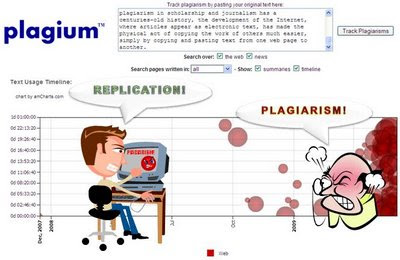
PLAGIUM?
THINKING
Better yet, Plagium is so easy-to-use (and cool!); you dont need to conduct workshops to teach educators on how to use it. A promotion link would do :)
PLAGIARISM?
This juicy tool discovery is so timely! Interestingly, I was discussing with a few educators yesterday about plagiarism. And they told me that they had reverted back to more MCQs (Multiple-Choice Questions) and abandoned written coursework for several of their courses as plagiarism was so rampant. This tool could be a good alternative (besides investing in commercial alternatives) to spot possible plagiarism.
Though, should we abandon written coursework, because plagiarism is so rampant among students?
First of all, lets abandon the word PLAGIARISM, and flush it down the toilet. Lets call it REPLICATION instead (at least I can pronounce it!). Secondly, we need to encourage students to replicate other peoples ideas and findings (in summarized form) to support their ideas and findings. However, when they replicate, they have to give credit and acknowledge where it came from. In other words, it is alright to replicate, but you got give credit to the author (That is all!).
Also, if the question enables the student to easily plagiarize (I mean replicate!), then the question should be flushed down the toilet. Why? Because we are reinventing the wheel! Why should a student waste his/her time writing a summary, or a review of something, if they can Google (or Wolfram Alpha) the answer in 3.2 seconds. I suppose for quantitative subjects it is understandable, but for qualitative subjects we could be a bit more creative.
For example, my Intercultural Communication teacher during my undergraduate studies would select recent articles (1-3 weeks old), and then ask us to analyze, summarize, reflect, evaluate, etc. (depending upon the article) using our own words. Our answer had to be less than 500 words (or was it 250 words! Cant remember!). If we wrote beyond that we would get minus points. By doing so, we were taught to be concise and precise (not sure if that is reflected in my blog, though!), and importantly made it very difficult for us to replicate another persons work out there.
The bottom line is that we should encourage students to write, replicate, mash-up, and synthesize information as much as possible, but we also need to emphasize the importance of appreciating and giving credit to the rightful authors when required.
Seriously, if we dont learn how to summarize, review, analyze, evaluate, and synthesize information during our University education, what kind of future can we expect in the 21st century? I can sing karaoke! Yippee!
Finally, if students really want to cheat, they will find a way. MCQs are certainly no exception :)
Monday, March 2, 2015
Down with Boring E Learning Interview with Dr Michael W Allen
Link to article (by Ryann Ellis)
"In Michael Allens (CEO of Allen Interactions) book, Michael Allen?s Guide to e-Learning: Building Interactive, Fun, and Effective Learning Programs for Any Company, Allen speaks out about his frustrations with today?s e-learning and brings fundamental issues to light. He also shares specific, commonsense guidelines that reliably produce effective and practical learning solutions.
What is the most misunderstood concept about e-learning?both in its current state and ideal state?
(Michael Allen) There are so very many misunderstood concepts, it?s hard to decide which is the most misunderstood. I guess it depends on one?s perspective. Let me give you a short list from several perspectives:
Business:
- Effective e-learning is expensive. Actually, it?s poor e-learning that?s expensive. Effective e-learning can bring amazing returns and pay for itself quickly over and over again.
- Boring e-learning is all we can afford. Actually, you can?t afford boring e-learning because it?s a total waste of time and money. You can?t learn people, they have to do the learning themselves. If they are bored, learning ceases. Your costs rise every time another learner wastes time in it.
Management:
- Its all about content: Get all the needed information out to people. Actually, it?s all about achieving desired performance levels, and that often means narrowing content down so that you can focus on creating meaningful, memorable, motivating learning experiences.
- Well be successful if the e-learning is developed on time and within budget. Actually, although these measures are important, quality matters. It?s critical to measure whether the training results in needed performance change and improvement. Otherwise, you really know nothing of importance.
Design:
- You need to start with the simplest concepts and tasks. Actually, the simplest concepts are often really boring. Learners prefer jumping into interesting tasks, then breaking them down into their components as it becomes understandably necessary.
- Before you can challenge learners with tasks, you need to ?teach? (read ?tell?) learners how to do them. Actually, it?s much more effective, for most of the American culture at least, to present challenges first. If learners can meet the challenge, you won?t have bored them by telling them things they already know. If learners can?t meet the challenge, they can ask for help. In asking for help, learners will value the information you give them and see its relevance immediately.
- You should give learners immediate feedback. Actually, delaying feedback as learners work through multi-step tasks is often much more effective. It entices learners to monitor their work more closely and make corrections without relying on external assessment and guidance."
Get Michael Allen?s Guide to e-Learning: Building Interactive, Fun, and Effective Learning Programs for Any Company, it is an interesting and useful guide to e-learning . Also, read this interview with Michael Allen, as he is one of the leading Gurus of e-Learning. We can all benefit from his experiences, practices, ideas and thoughts.
Friday, February 27, 2015
Gamify Classroom Learning with the C2S2C Method!

The C2S2C (pronounced See-Es-See) method can be applied to gamify any type of learning activity! WOW! This is my second learning friendly innovation for 2013 (First one: L2T3SEA learning framework)! Not bad, Al-Hamdulilla :)
CONFERENCE
What if learning could be as engaging and addictive as Angry Birds? In this workshop, we will explore how we can use game mechanics to facilitate more engaging and inspiring learning experiences for our students. During the hands-on session we will explore three web 2.0 tools we can use to gamify classroom learning.
Learning Outcomes:
After this workshop, you will be able to:
- Discuss how game mechanics can be applied to facilitate more engaging student learning experiences.
- Apply game mechanics to any learning activity.
- Use three web 2.0 tools to gamify classroom learning.
PRESENTATION SLIDES
Here we go:RESOURCES
Here is easy access to the relevant resources for the workshop:*$ = No Free Version
Tools:
- Socrative
- Infuse Learning
- Poll Everywhere
- Classtools
- Raptivity ($)
- Knowledge Guru ($)
- 102 Free EduGames
- From Flipped to Gamified Classroom Learning!
- Gamification Wiki
- Gamification Co
- 10 Best Colleges for Game-Based Learning
- Gamification Course
- The Gamification of Learning & Instruction (Book) ($)
- Gamification by Design (Book) ($)
- Web 2.0 Interactive Tools: A Quick Guide
Monday, February 16, 2015
Up Close and Personal With the JooJoo

Review By Sovy
Conceived as a tablet PC that is well suited for anytime web browsing, the JooJoo is a browser based device that has taken a lengthy time for its launch which were marked with lots of dramatic climaxes. With a massive 12 inch screen, the JooJoo is also the biggest slate pc available in the market. And being in a segment that has the all conquering iPad ruling the roost, the obvious question that does pop out is whether the JooJoo is better or at least at par with the iPad. Also, for an amount of €359 is the JooJoo worth the experience is the question that hounds us too. All this along with many more is what this comprehensive review of the JooJoo Tablet PC from Fusion Garage will bring to the fore.
Overview:

The JooJoo is one exquisitely crafted device, one that can match with the best from Apple. In fact, so well built is the JooJoo that it can well be mistaken for an Apple device but for the JooJoo name tag. There’s just one single button on the front left edge of the Tablet PC, which otherwise is an LCD screen in totality. The design theme is minimalist at best and JooJoo excels in this. All in all the JooJoo has been very exquisitely designed without much of frills in its outer appearance.
The rear end of the device sports a champagne colored brushed aluminum finish that lends it a very stylish look and feel. At the middle though the device is a wee bit thin and this is specially accentuated due to the overall expanse of the tablet. However, at 12.8 x 7.8 x 0.7 inches, and the JooJoo is far from being the ‘handheld’ device like the iPad or the Kindle and Nook that Fusion Garage would like us to believe it is. A weight of 2.4 pound does not help things either, which makes it convenient to use only in a sit up position. With the dimensions and weight mentioned above, the JooJoo is perhaps the last thing that you would like to hold up lying down.
Along the right edge of the device there’s single USB port, along with a standard headphone and microphone jack. The only thing you can do with the USB port is to charge the device since the OS of JooJoo is entirely browser based. So there’s no way you can load music, videos or pictures into the device. There’s a camera situated above the screen and is meant to be used for video conferencing.

The dominating feature of this device is its screen, and a 12 inch display at that. It is a capacitive touchscreen with a resolution of 1366 x 768 pixels. Light finger movements across the face of the screen are enough to carry out the functions and is indicative of its sensitivity. Once again the drawback that bites off part of this otherwise fabulous feature is the fading effect that is experienced if the screen is tilted to a 120 degree angle. JooJoo scores with its horizontal viewing angle though as it is wide enough to enable you to share the screen with your friends.
The device has an accelerometer and this adjusts the display quite smoothly while the device is transiting between vertical and horizontal orientation. At times though, the adjustment needed an extra jerk to draw upon the accelerometers attention, a shortcoming that makers Fusion Garage revealed will be taken care of in a future software update. Light sensors on the other hand, adjust screen brightness based on ambient lighting very effectively. To cap up on hard ware features, the sound system is sufficient for personal hearing only as the case is with notebook PCs and isn’t loud and clear enough to be heard all over the room.
Software:

The first of the real drawback of the JooJoo can be experienced when one tries out the OS and browser both of which are Linux based. Shortcuts are the only way to go to a site, but the shortcuts are fixed to particular sites only. Grouped under various heads, like News, Social Networking or Entertainment one is led to the particular site fixed under that group when selecting the shortcut. To go to any other site of personal choice one has to retype the site address into the browser only after opening the predestined web page. Another missing feature is the lack of any application to view pictures or playing music. One can only adjust the brightness of the screen or the Wi-Fi and nothing much else.
With its wide display, viewing web pages should indeed have been an unadulterated experience of pleasure. However, here too JooJoo has included an issue that mars this pleasure feeling. The aspect ratio of the JooJoo display screen is 16:9, which gives extra space when held in landscape mode, but crops certain details when held in portrait orientation. JooJoo could have selected a better aspect ratio while maintaining the advantage of greater pixel accurate rendition on the display screen.
That is also not an end of all the laments that torment a web viewer. The navigation bar which is a basic necessity for web browsing and therefore for such a web specific device as the JooJoo, has its own faulty nuances. The navigation bar is a floating one rather than being fixed. To unhide it a swipe action of the finger is required. While this may seem to be a very simple process, the real complication begins when the screen comprehends the swipe as a selection prompt rather than its intended intention. Then there’s also no certainty that swipe action will yield the desired result, more so if the JooJoo is into something else. And if you put in a few more taps, you will be led to the previous screen or the home screen, as the situation might be.
Further on the issue of swiping, the device can recognize only a two finger swipe and not a single finger swipe. This adds to the woes of the user as it becomes a hindrance while holding the device with one hand and trying to make it work with the help of two fingers of your other hand at the same time. Then the Pinch-to-Zoom feature isn’t supported either.
Two onscreen keyboards have been provided and both can be set at different places on the screen. The keyboard that appears when the device is held in vertical position is meant for typing in short text info, like that used for short messaging. The longer keyboard comes up only when the device is held in horizontal orientation. The keyboard once again is un-predictive. For instance while there is a key for an apostrophe, pressing on it will input an open quote only. Then there is every chance of the keyboard going dead, like it would not respond at all even after several key presses. One more thing that the company said will rectify with a software update. Apart from these, the device does not also support predicative text inputting or automatic capitalization.
In fact, there seems to be no end of software flaws. Like for instance, the bookmark dialog does not display correctly while the device is held vertically. Close the browser and you will be automatically logged out of a site or forum like the Twitter or Facebook. Then the side scrolling tabs, which are to be swiped upwards to close a page, also does not work consistently. These are just some of the more frustrating of software flaws the bugs the JooJoo.
Performance:

The JooJoo boots up in 7 seconds flat and the rest of its operations are indeed snappy. This can be attributed to it being equipped with the 1.6GHZ Intel Atom N270 processor. It also has 1 GB RAM and a 4 GB solid state drive. WiFi speeds too are quite decent.
Flash Support:

Fusion Garage has also added an NVIDIA Ion Graphic card on the device just to ensure playing Flash Video in full screen mode is a breeze. However, all of this comes to a nought due to the lack of appropriate software support. It currently runs Flash 10.1 beta 1 and hardware-accelerated Flash video seems to be nowhere in sight at least as of now with Adobe too being partly responsible for this. What all this means is that while the CPU is able to decode regular-sized YouTube videos, but viewing a full-screen Hulu will be jittery while a 720p YouTube video would be rendered like a slide show.
Battery Life:
The Atom / Ion combo though calls upon the JooJoo’s battery resources quite generously so that the JooJoo’s three cell battery is able to support just moderate use like net browsing and playing short videos on the tablet for only about 2.5 hours. This when the battery is supposed to last 5 hours as per company sources, but only if the Flash is kept out of the loop completely. Then the device also tends to get heated up quite considerably. This has been confirmed by the makers of the device also. A better option would have been if the makers had gone for an Arm processor like NVIDIA Tegra or else using Broadcom’s Crystal HD Solution with an Intel Atom N450 combination. Less power drain would have been assured in any of these combinations.
Conclusion:

The rain of seemingly endless lament continues about the JooJoo and its shortcomings. Like from it being less portable to its endless software woes, a screen that though is large but simply not up to the mark, or a battery that is far from impressive. A comprehensive software update has been promised by the company which they claim will lay to rest most of the JooJoo’s shortcomings. Till then unfortunately, the JooJoo has its task cut out against the likes of the iPad.
http://goodereader.com/blog/tablet-slates/up-close-and-personal-with-the-joojoo-a-review/
Sunday, February 15, 2015
Resize an Amazon EBS Volume Cent OS with CPanel

- Create a snapshot of the volume you want to resize.
- Create a new bigger volume from the snapshot.
- power off (Stop) the Instance.
- Check the old volumes attachment information if you are not familiar with this (You will need to specify this on device: /dev/sda1).
- Detach the old volume.
- Attach the new bigger volume.
- Power on (Start) the instance.
- Go to WHM and log in as root
- Check if your servers ip has changed (it most definitely will) (IP Functions> Show IP Address Usage) copy the ip that will have your servers name.
- Go to (Server Configuration>Basic cPanel & WHM Setup).
- Go to Basic config change the ip address to the servers shared ip address that you copied above.
- Go to your WHM backend (Resellers>Manage resellers main/shared IP) and change all resellers ips to the servers main shared ip.
- Go to (Account Information>List Accounts) Edit the ips of all the accounts listed there to your servers ip (you copied it earlier).
- Ping your elastic IP (your Security Group should allow: ICMP from 0.0.0.0/0)-Not a requirement for this tutorial it just helps you see if the server is up.
- You now need to restart the server for the ip changes to take effect. (System Reboot>Graceful Server Reboot).
- When the server comes back up you will be able to see it pinging.
- You can now access your websites again and you have managed to attach a bigger EBS volume however the additional space is not being recognized.
- To check space (From SSH- run: #df -h) (From WHM: Server Status>Server Information)
- To resize the volume (connect via SSH and run:#resize2fs /dev/sda1) you will see something like this (Performing an on-line resize of /dev/sda1 to 131072000 (4k) blocks.)
- When it completes it will display (The filesystem on /dev/sda1 is now 131072000 blocks long.)
- If you now check from SSH or CPanel (see step 17) you will see that now all the volumes space is available

Saturday, February 14, 2015
Need for Speed Underground 1 for PC full version with system requirements

Need for Speed Underground borrows, instead of simulating, from the increasingly popular custom kit and import car scene. The days when Dodge Neons, VW Golfs, Subaru Imprezas and Mazda Miatas were just reminders you couldnt have a flashy sports car are gone; in the ever-growing circle of elite street racers, dedicated auto fanatics are turning the mid-range class of almost-sports-cars into decked out, eye-catching street rockets. The underground scene of backstreet, nighttime racers has evolved into a whole new industry. Companies like AEM, Enkei, Jackson Racing, HKS, and StreetGlow provide lines of custom upgrades for otherwise everyday cars -- like the Impreza -- so you can deck them out and turn them into your personalized street machine.
Black Box and EA have gone to great measures to capture this gritty, sometimes seedy underworld, partnering with the biggest product lines and major car manufacturers. It seems its goal was to create a racer that provided more vehicle customization than anything ever seen before, and to this extent it succeeded brilliantly. The flexible car customization mode offers up 20 different vehicles, not a huge number, but with all the different options the variety of personalized cars you can create is in the billions, according to EA. These "Customize Your Ride" options take center stage of the gameplay. Undergrounds single-player mode is intimately tied into unlocking new parts for your car -- both of the performance increasing and aesthetic variety.
The total gameplay experience is tuned into the 111-objective "Underground" mode. Like a story, it unfolds as your challengers message you via your in-car video display. There are a few FMV sequences now and then, but mostly it is just audio clips and animated heads that deliver your objectives. It works perfectly, however, and is presented seamlessly. To diversify gameplay from just being regular racing as weve seen it before, Black Box crafted a number of different race types -- essentially you have Race, Drift, and Drag. Race is actually broken up into a number of styles, including point-to-point (one long stretch of a track), circuit (multi-lap), and knockout (cars in last place are booted each lap; last car across the line wins). So, theres a respectable variety to mix up Undergrounds story mode. Read more
System requirements:
MINIMUM PC REQUIREMENTS
Windows 98/ME/2000/XP
Pentium III or AMD Athlon 700MHz Processor
128MB RAM (256MB for 2000/XP)
8X CD-ROM/DVD-ROM Drive
2.0GB Hard Disk Space
32MB Direct3D compatible Video Card
DirectX 9.0
Keyboard
Mouse
MULTIPLAYER SYSTEM REQUIREMENTS
Broadband Internet Connection
256MB RAM
Screen Shots: Click on the image to view large
 | .JPG) |  |

Need for Speed Under Ground 1 for PC: Download
Friday, February 13, 2015
LOARIS TROJAN REMOVER 1 2 5 0 FULL VERSION WITH CRACK
Info:
 Loaris Trojan Remover – a program with which you can completely clean your computer from Adware, Spyware! Are you bombarded with popup ads, seeing new toolbars in your browser, your home page changing to unwanted destinations or are you bombarded with irritating spam? Perhaps strange software loads on startup or your favorites have new entries that you do not want. If so .. Your PC is likely infected with adware, spyware, spybot, Trojans or other Internet parasites. These programs have the ability to track your habits (by tracking requests, ARP yes you visit the Internet), and even steal such personal information as bank account numbers and passwords. Spyware can install more parasites on your computer without your consent. Everything you do and everything you type is being recorded right now! Companies know what your interests are!
Hackers can access your PC and do whatever they want. They can even steal your identity! Solution: Download the latest version Loaris Trojan Remover right now. You will be able to completely clean your computer of all these invasive threats! Your computer will be clean and will run a lot faster – Your Privacy will be Protected! Appendix Loaris Trojan Remover aids in the removal of malicious software: Trojans, Worms, Adware, Spyware – when standard antivirus software or are unable to detect them or fails to effectively eliminate them. Standard antivirus programs are good at detecting this Malware, but not always good at their disposal. Trojan Remover is designed specifically to remove these programs without having to manually delete them. The program also removes the additional system upgrades that have been introduced malicious software. Trojan Remover scans all files downloaded during the launch system, the presence of Adware, Spyware, Trojans, Internet worms, etc. Two types are available. Standard antivirus scans the system without the need for further choosing. Utility will choose any of the folders to scan.
Additional Tools:
• Reset Internet Explorer Home/Start/Search Page Settings
Some Malware programs make changes to the Internet Explorer Home, Start and Search Page settings in order to re-direct the web browser to different websites. This Utility will reset the Home/Start/Search pages to standard Defaults. You can then manually reset your Home Page to your website of choice (or leave it “blank”, the default).
• Reset HOSTS file
The Windows HOSTS file is a text file which stores website addresses. The file can be used to speed up access to websites you visit often – by equating the website name (e.g. microsoft.com) with its DNS address, the web browser can find the website more quickly as it does not have to query a DNS Name Server. Some Malware programs add entries to this file, to either deny access to websites (usually security-related or antivirus company websites), or to re-direct access to websites of their choosing.
• Reset Windows Update Policies
Some Malware programs attempt to prevent Windows Update from running, and inhibit access to resetting Windows Update by blanking out the Windows Update options on the Update configuration screen. This Utility will check the current Windows Update settings and correct them where necessary.
Screen Shots: Click on the image to view large screen
 |  |  |
Thursday, February 12, 2015
Writing Raster Data with Python gdal
I first get and register the appropriate driver for the output file:
        >>> driver = gdal.GetDriverByName(HFA)
    >>> driver.Register()
I want to use the same size from the input file which is in "dataset" as in the previous post
    >>> cols = dataset.RasterXSize
    >>> rows = dataset.RasterYSize
    >>> bands = dataset.RasterCount
    >>> datatype = band.DataType
Then Creating the output file:
>>> outDataset = driver.Create(ERS1PRI_19920430.pix, cols, rows, bands, datatype)I want my outputfile to have the same georeferencing and projection information as the input file (the "0" shows the execution went fine):
>>> geoTransform = dataset.GetGeoTransform()
    >>> outDataset.SetGeoTransform(geoTransform )
    0
    >>> proj = dataset.GetProjection()
    >>> outDataset.SetProjection(proj)
    0
    >>>
That has to be assigned before writing the data to the output band, otherwise its not in the file!
Before writing the data, I have to get the band from the newly created file:
>>> outBand = outDataset.GetRasterBand(1)
Now I can write the input image to the new output image:
>>> outBand.WriteArray(data, 0, 0)
clean variables and close files
>>> dataset = None
   >>> band = None
   >>> outBand = None
   >>> outDataset = None
[still to find out: got this to work for PCI format, with ENVI hdr the image but not the geoinformation was transferred and Erdas img did not work -- file too big?]Wednesday, February 11, 2015
Prince of Persia The two thrones for PC full version with System Requirements

The Prince of Persia: Sands of Time trilogy has always been known for its tight controls and satisfying environmental puzzles set in beautiful levels. The series control scheme has served as a model for countless other games that also feature an acrobatic protagonist like the prince. The same great interface remains in the third game of the series, The Two Thrones. Like the other two games, youll find yourself wall running, jumping, flipping, and vaulting your way up fiendishly designed environmental puzzles, as well as fighting vicious enemies with the improved combat system introduced in the last game, Warrior Within. The prince has a few new tricks up his sleeve as well, but longtime fans of the series should still feel right at home.
The story of the Sands of Time trilogy began with the princes army attacking and conquering the capital of the Indian empire. In the midst of the battle, however, an evil vizier caused the release of the sands of time, wreaking havoc over the city and the surrounding countryside. The prince and an Indian princess named Farah battled together to defeat the vizier, bottled up the sands, and restored the world to a normal state. The story continued in Warrior Within, where an embittered prince set sail for the Island of Time, seeking sanctuary from an unstoppable time creature called the Dahaka, who pursued him endlessly because of his part in unleashing the sands of time. There, the prince battled not only the Dahaka, but also Kaileena, the Empress of Time. Fans of the first game felt the series lost a lot of its soul in Warrior Within, as the suddenly cynical prince was much more arrogant and less likable.
The Two Thrones begins with the prince returning to Babylon from the Island of Time with the mortal Kaileena as his new lover (this part of the plot may be confusing to those who didnt see the alternate ending of Warrior Within). As they pull in to the harbor at Babylon, the duo finds the city under siege. Their ship is wrecked by the invaders, and Kaileena is captured by the enemies. You quickly find that the vizier is back and responsible for the uprising. He murders Kaileena and unleashes the sands of time upon Babylon, and the prince must battle to regain his kingdom and avenge Kaileenas death.
But its not just sand creatures and other bad guys from the viziers army that the prince must fight. With the sands of time infecting his soul, the prince must also battle the whims of his darker, more arrogant side. Throughout the games long, 12- to 15-hour campaign, the prince will morph back and forth between his normal self and the dark prince. Hell also have internal dialogues between his split personalities, with the original actor from Sands of Time voicing the normal prince, and a new voice actor representing the sneering, more sarcastic dark prince. Here, the game almost becomes self-referential in addressing the popular criticism levied against the arrogant prince from Warrior Within. The internal strife in the schizophrenic princes mind forms a compelling part of the storyline in The Two Thrones, especially because both the writing and voice acting are pretty good.
System requirements:
Windows XP/2000
AMD Athlon or Pentium III 1GHz Processor
256MB RAM
16X CD-ROM Drive
1.5GB Hard Disk Space
DirectX 9.0c Compatible Video Card
DirectX 9.0c Compatible Dolby Digital Live Sound Card
DirectX 9.0c
Screen Shots: Click to view large
 |  |  |
Download