Showing posts with label on. Show all posts
Showing posts with label on. Show all posts
Friday, March 13, 2015
Manymoon sees 30 higher conversions on Google Apps Marketplace
Editors Note: This post was written by Amit Kulkarni, CEO at Manymoon, a company that provides team and project management software. We invited Manymoon to share their experiences building an application on top of Google Apps utilizing some of our APIs.
An Idea
We started Manymoon with the idea of bringing social communications to the workplace. Not because it was cool, but because we think the best way to get work done is with the help of the people around you while still minimizing interruptions.
Like most start-ups, we wanted to build something we’d use ourselves. As heavy Google Apps users, we immediately saw the benefit of integrating Manymoon with Google Apps for tracking tasks or projects.
We also knew that professionals have unique requirements:
This led us to create Manymoon: a social productivity tool. It allows you to leverage your professional network to get work done. That means doing things like tracking conversations, managing projects, completing tasks and sharing documents. That was the easy part, now we just had to build it and find customers.
Finding Customers
The market opportunity speaks for itself: Google Apps has over 30 million users spanning over 3 million businesses. It’s also a growing business since they’re signing up over 3,000 new businesses per day. We would be in good shape if we got a small fraction of this flow.
Most importantly, the Google Apps Marketplace brings qualified customers who are comfortable using the cloud to run their business. Google Apps customers understand the value of:
How We Did It
As a start-up, one of our advantages is time to market. There are numerous features that would have normally taken us months to develop but we accelerated the process by leveraging a variety of Google APIs and products.
Google Docs
Attach a Google Doc to a task or project and Manymoon will automatically handle the sharing permissions. This is the feature that consistently receives the most “wow” comments from customers.
Google Calendar
Keep your calendar automatically updated with relevant tasks and project information. We saved months that would have been required to build features such as reminders, views and meeting requests.
OpenID & Google Universal Navigation
Business customers already trust Google with their data, and this significantly reduces the friction in activating users. And with Google Universal Navigation, new users can experience Manymoon immediately without even having to register. Using Single Sign-On means users can move seamlessly from Google Apps to Manymoon without needing to re-enter their credentials.
Google Contacts
Contact integration via Google Contact API makes it incredibly easy to assign a task to someone or invite them to a project. Just enter their name! No more remembering email addresses or having to import contacts.
Gadgets!
Our customers are Google Apps customers first and foremost and this makes it simple to use Manymoon in the environment they’re already used to. We support a Gmail Contextual Gadget so users can create tasks and projects without ever leaving their inbox. And a Google Sites/iGoogle gadget allows project data to be part of more complex wiki and portal pages that customers build. Ultimately, Google Gadgets significantly reduce the friction for users to create and track projects.
The Results
The results have been fantastic. Since the launch of the Google Apps Marketplace in March, we’ve been signing up as many as 1,000 new businesses per week ... and that’s with no sales or marketing people in our company. These customers are finding us on their own in the Google Apps Marketplace, adding the app and getting engaged with it.
Google Apps Marketplace customers upgrade to a premium edition of Manymoon at a 30% higher rate than non-Google Apps Marketplace customers. The best part, however, is that our monthly registrations increased by 150% since the launch of Google Apps Marketplace. And that’s where the Marketplace really excels, it provides large enough volumes to make the Freemium business model work.
We also closely monitor business sign-ups since their users activate over a period of time. If a business with 1,000 employees signs up to Manymoon, some fraction of those users will use Manymoon in the 1st day. But a larger fraction will use it in the first week and and an even larger in the first month.
What We’ve Learned
We think there are three ingredients that are important to sustaining a large number of business sign-ups from the Google Apps Marketplace:
1) Appeal to a broad audience - Google Apps customers comprise all types of industries and job functions. Manymoon is broad enough to apply to most of them, so we cast the widest net and try to appeal to as many as possible.
2) Integrate deeply - of course most all Google Apps customers use Gmail. But each customer has its own mix of Google Apps they use (e.g., Google Docs + Gmail, Google Sites + Gmail, etc). We built Manymoon to be flexible enough to accommodate any of these mixes.
3) Demonstrate immediate value - logging in using a Google Apps account is the price of admission (literally). To really engage customers, you have to very quickly demonstrate additional ways your app works with Google Apps. We do this during the registration process.
How To Get Started
Google provides open APIs with very good documentation that can be accessed here. They also have a simple and transparent process for listing your app. We were able to find everything we needed to build and integrate Manymoon with Google Apps.
Read more »
An Idea
We started Manymoon with the idea of bringing social communications to the workplace. Not because it was cool, but because we think the best way to get work done is with the help of the people around you while still minimizing interruptions.
Like most start-ups, we wanted to build something we’d use ourselves. As heavy Google Apps users, we immediately saw the benefit of integrating Manymoon with Google Apps for tracking tasks or projects.
We also knew that professionals have unique requirements:
- Utility - professionals are busy throughout the work day and get judged on productivity. Any app they use needs to provide tangible value with immediate gratification. And what’s more satisfying than completing a task or project?
- Security - they need the ability to control what’s shared and with whom.
This led us to create Manymoon: a social productivity tool. It allows you to leverage your professional network to get work done. That means doing things like tracking conversations, managing projects, completing tasks and sharing documents. That was the easy part, now we just had to build it and find customers.
Finding Customers
The market opportunity speaks for itself: Google Apps has over 30 million users spanning over 3 million businesses. It’s also a growing business since they’re signing up over 3,000 new businesses per day. We would be in good shape if we got a small fraction of this flow.
Most importantly, the Google Apps Marketplace brings qualified customers who are comfortable using the cloud to run their business. Google Apps customers understand the value of:
- Not having to install or maintain software
- Software that requires minimal training
- Self-service software (they don’t require significant amount of in-person sales or support).
How We Did It
As a start-up, one of our advantages is time to market. There are numerous features that would have normally taken us months to develop but we accelerated the process by leveraging a variety of Google APIs and products.
Google Docs
Attach a Google Doc to a task or project and Manymoon will automatically handle the sharing permissions. This is the feature that consistently receives the most “wow” comments from customers.
Google Calendar
Keep your calendar automatically updated with relevant tasks and project information. We saved months that would have been required to build features such as reminders, views and meeting requests.
OpenID & Google Universal Navigation
Business customers already trust Google with their data, and this significantly reduces the friction in activating users. And with Google Universal Navigation, new users can experience Manymoon immediately without even having to register. Using Single Sign-On means users can move seamlessly from Google Apps to Manymoon without needing to re-enter their credentials.
Google Contacts
Contact integration via Google Contact API makes it incredibly easy to assign a task to someone or invite them to a project. Just enter their name! No more remembering email addresses or having to import contacts.
Gadgets!
Our customers are Google Apps customers first and foremost and this makes it simple to use Manymoon in the environment they’re already used to. We support a Gmail Contextual Gadget so users can create tasks and projects without ever leaving their inbox. And a Google Sites/iGoogle gadget allows project data to be part of more complex wiki and portal pages that customers build. Ultimately, Google Gadgets significantly reduce the friction for users to create and track projects.
The Results
The results have been fantastic. Since the launch of the Google Apps Marketplace in March, we’ve been signing up as many as 1,000 new businesses per week ... and that’s with no sales or marketing people in our company. These customers are finding us on their own in the Google Apps Marketplace, adding the app and getting engaged with it.
Google Apps Marketplace customers upgrade to a premium edition of Manymoon at a 30% higher rate than non-Google Apps Marketplace customers. The best part, however, is that our monthly registrations increased by 150% since the launch of Google Apps Marketplace. And that’s where the Marketplace really excels, it provides large enough volumes to make the Freemium business model work.
We also closely monitor business sign-ups since their users activate over a period of time. If a business with 1,000 employees signs up to Manymoon, some fraction of those users will use Manymoon in the 1st day. But a larger fraction will use it in the first week and and an even larger in the first month.
What We’ve Learned
We think there are three ingredients that are important to sustaining a large number of business sign-ups from the Google Apps Marketplace:
1) Appeal to a broad audience - Google Apps customers comprise all types of industries and job functions. Manymoon is broad enough to apply to most of them, so we cast the widest net and try to appeal to as many as possible.
2) Integrate deeply - of course most all Google Apps customers use Gmail. But each customer has its own mix of Google Apps they use (e.g., Google Docs + Gmail, Google Sites + Gmail, etc). We built Manymoon to be flexible enough to accommodate any of these mixes.
3) Demonstrate immediate value - logging in using a Google Apps account is the price of admission (literally). To really engage customers, you have to very quickly demonstrate additional ways your app works with Google Apps. We do this during the registration process.
How To Get Started
Google provides open APIs with very good documentation that can be accessed here. They also have a simple and transparent process for listing your app. We were able to find everything we needed to build and integrate Manymoon with Google Apps.
Want to weigh in on this topic? Discuss on Buzz

Tuesday, March 3, 2015
The Most Influential Doctors on Twitter!

"Twitter Doctors is a new site that lists and ranks all the doctors who are active on Twitter based on number of followers, retweets, etc."
- Bertalan Meskó
- Bertalan Meskó
In short, a directory of the most influential doctors on Twitter. I love it :)
Sunday, March 1, 2015
Infographic on Steve Jobs Amazing Life Genius!

Check out this awesome infographic by Infographic World exploring Steve Jobs incredible accomplishments over his 56 years of existence (Amazing Genius!):

Created by: Infographic World
The only issue I have with this infographic is the latest stats on Apples value, product sales, downloads, and usage info, which are already kind of outdated. For example, Apples market cap today has already surpassed 400 Dollars, which makes Microsoft look even worse in comparison.
Whatever it is, Steve Jobs did an amazing job to transform Apple since he returned after being kicked out (which he ironically co-founded with Steve Wozniak). It will be interesting to see how Apple will be doing in 5 years time.
As I am writing this post on my MacBook Air (having also an iPod, iPhone and iPad), I am certainly one of those (millions) that have been influenced tremendously by his innovations. Steve Jobs might not be around anymore, but his ideas, achievements and innovations will live on for ...
As I am writing this post on my MacBook Air (having also an iPod, iPhone and iPad), I am certainly one of those (millions) that have been influenced tremendously by his innovations. Steve Jobs might not be around anymore, but his ideas, achievements and innovations will live on for ...
THANK YOU!
GENIUS... AND JERK, TOO?
Well, I suppose it is not good to find fault and criticize a dead man (no chance to rebut!), but I suppose we should know that Steve Jobs also had a darker side (ignored mostly here to show respect), which was originally purposely left out.
But, I suppose having a more balanced view (as Maurice Ward commented) of a man like Steve Jobs is important. Surely, we would love to inspire innovations like him, but perhaps not in manner he did it (or Apple did it!). In other words, the output was great, but the process of getting there could certainly have been done in a more humane manner.
GENIUS... AND JERK, TOO?
Well, I suppose it is not good to find fault and criticize a dead man (no chance to rebut!), but I suppose we should know that Steve Jobs also had a darker side (ignored mostly here to show respect), which was originally purposely left out.
But, I suppose having a more balanced view (as Maurice Ward commented) of a man like Steve Jobs is important. Surely, we would love to inspire innovations like him, but perhaps not in manner he did it (or Apple did it!). In other words, the output was great, but the process of getting there could certainly have been done in a more humane manner.
"Even in death, Steve Jobs can sell us anything, including the story of what a complete and complex jerk he could at times be. "- Judith Timson
"One thing he wasnt, though, was perfect. Indeed there were things Jobs did while at Apple that were deeply disturbing. Rude, dismissive, hostile, spiteful: Apple employees—the ones not bound by confidentiality agreements—have had a different story to tell over the years about Jobs and the bullying, manipulation and fear that followed him around Apple. Jobs contributed to global problems, too. Apples success has been built literally on the backs of Chinese workers, many of them children and all of them enduring long shifts and the specter of brutal penalties for mistakes. And, for all his talk of enabling individual expression, Jobs imposed paranoid rules that centralized control of who could say what on his devices and in his company."
- Ryan Tate

Yes, it would have been good to have an infographic illustrating a more balanced view of Steve Jobs.
Thursday, February 26, 2015
Run Android Apps on PC Free
 |
| Enjoy Android Apps on PC with Bluestack |
How to Run Android Apps on PC?
Now a days smart phones become basic need of a social human. There are very interesting stuff in smart phones like addictive apps and games. Specially Android platform provide a lot of apps and games that are very addictive. The first apps to go viral at an unprecedented pace were the apps with calling and texting, which are capable of reducing the burden on your wallet by helping you stay in touch with your dear ones. Such apps are rightly called “Over The Top” or OTT apps, some examples are We Chat, WhatsApp, Viber, Line, Rebtel etc. The important differences in these apps are that only a few of these apps help you make phone calls (Rebtel and Viber), the others are only text messaging based. So many people want to try Android Apps on their PC so i got this solution for them. Follow this easy tutorial and enjoy Android Apps on your Pc.
Steps to Get Android Games/Apps on your PC:
- First of All Download the Android Emulator from the link below.
- Click Here to Download Bluestacks.
- Youwave is a good emulator too, but it won’t work with ARM based apps.
- Install Bluestacks and run it. Note: You might run into graphics errors during installation,But still you can find out the solutions to almost most of the Bluestacks errors here.
- On the home page of Bluestacks, click on the search button and type in the name of the app or the game you want.
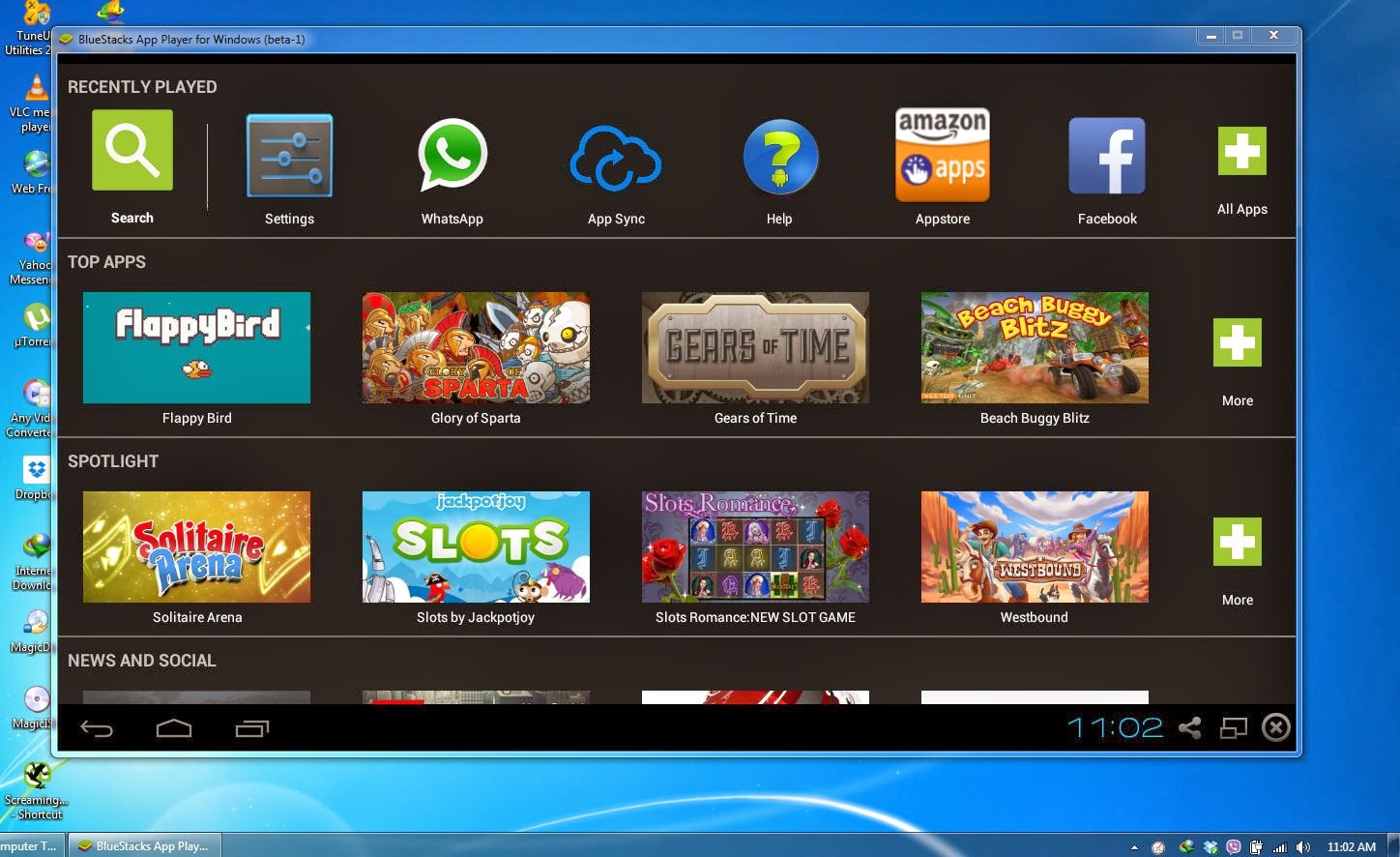 |
| Bluestacks Android Emulator |
- Select one of the many app stores and install the app.
- Go back to the home page and you should see the app listed there, you should be able to double click the app and run it.
Wednesday, February 18, 2015
How to Bypass Cyberoam by using Wayback Machine to Access Blocked Sites on Wi Fi 100 Working
![How to Bypass Cyberoam by using Wayback Machine to Access Blocked Sites on Wi-Fi [100% Working]](https://blogger.googleusercontent.com/img/b/R29vZ2xl/AVvXsEhKG-PjxtsBAVmUFMQGnFvzPts6zEOOxRR-oun0VrW68pa-DrSMhI6u8CVYfaqutyaLH5RT_qHigPZ4ZuW3BOh6I1j9iTAZarF_UbqS0yIqvfmRgnmbN5wMJ6uplcolFOb7XDXOYNQ307og/s640/How+to+Bypass+Cyberoam+by+using+Wayback+Machine+to+Access+Blocked+Sites+on+Wi-Fi+%5B100%25+Working%5D.jpg "How to Bypass Cyberoam by using Wayback Machine to Access Blocked Sites on Wi-Fi [100% Working]")
Does your college/school/office have blocked sites on wi-fi? Are you not able to get access? Then probably you are at the right place. The same has happened with me. In my college sites are blocked by using a firewall known as Cyberoam. By doing a lot of search I came to a solution. Here we are going to use Wayback Machine to get over this kind of problem. I have personally tested this and it is 100% working. This method will also work for any other firewalls. So before going through the solution let’s take a brief knowledge about wayback machine.
Also Read: Google Gravity: How to Hack Google Homepage (Funny Trick)
Also Read: Using a VPN Service – How to Hide Yourself Online
What is Wayback Machine?
The Wayback Machine is a web site that allows you to see any particular site like it looks in past. It’s same as like using a time machine to go back in past. When you will paste the url of you site that you want to visit, then it will show a calendar with snapshots of a particular day and even a particular hour.
Wayback machine is a great solution to access blocked sites but it has some limitations.
1. Sometimes the site performance is very slow and it is unable to crawl some web pages.
2. In case it will not show recent snapshot then you will be not able to see the contents of a particular site that has been updated recently.
3. You can’t use any download manger to download files. You can download only through the browser.
How to Access Blocked Sites using Wayback Machine?
1. First of all go to link web.archive.org
2. Now paste the url of the site that you want to visit in the given box and then click on ‘Take Me Back’, as shown in below image.
![How to Bypass Cyberoam by using Wayback Machine to Access Blocked Sites on Wi-Fi [100% Working]](https://blogger.googleusercontent.com/img/b/R29vZ2xl/AVvXsEhb4XgDKtRT1wCHGipT4-8L7J_VEg0T51XPsRLtjd1083GdEHMabQuqNJfX6xcNl5OkiGRXvMbzNKlcv19WQkFMBOTaXeuMvuufIJre_GeBOQcRxJGNAIpSst0gLaIC6Xs19Lcp2hcRhvmu/s640/How+to+Bypass+Cyberoam+by+using+Wayback+Machine+to+Access+Blocked+Sites+on+Wi-Fi+%5B100%25+Working%5D+1.jpg "How to Bypass Cyberoam by using Wayback Machine to Access Blocked Sites on Wi-Fi [100% Working]")
3. After that a calendar will be displayed with different snapshots.
![How to Bypass Cyberoam by using Wayback Machine to Access Blocked Sites on Wi-Fi [100% Working]](https://blogger.googleusercontent.com/img/b/R29vZ2xl/AVvXsEjjmhz0sxI8Y4F6x2qVUVQO6l0mubPWzu86hepXrlg4cUat7rtOsqJT2HMFdj1U6nBdd8MeQ3IeaFLUHM_2i-Cx55jhVVuEVovmr7w6QgHMErmlenp6JGO3f__y-D9tBrcKlxaw7WPnm9ZP/s640/How+to+Bypass+Cyberoam+by+using+Wayback+Machine+to+Access+Blocked+Sites+on+Wi-Fi+%5B100%25+Working%5D+2.jpg "How to Bypass Cyberoam by using Wayback Machine to Access Blocked Sites on Wi-Fi [100% Working]")
4. Then click on your desired snapshot, now you will be able to see the
blocked site.
In this way you can get access to restricted sites and can download files on wi-fi or on any other network. If you have any other methods then please do share it with us by commenting below.
Thursday, February 12, 2015

Subscribe to:
Posts (Atom)