Friday, March 13, 2015
Manymoon sees 30 higher conversions on Google Apps Marketplace
An Idea
We started Manymoon with the idea of bringing social communications to the workplace. Not because it was cool, but because we think the best way to get work done is with the help of the people around you while still minimizing interruptions.
Like most start-ups, we wanted to build something we’d use ourselves. As heavy Google Apps users, we immediately saw the benefit of integrating Manymoon with Google Apps for tracking tasks or projects.
We also knew that professionals have unique requirements:
- Utility - professionals are busy throughout the work day and get judged on productivity. Any app they use needs to provide tangible value with immediate gratification. And what’s more satisfying than completing a task or project?
- Security - they need the ability to control what’s shared and with whom.
This led us to create Manymoon: a social productivity tool. It allows you to leverage your professional network to get work done. That means doing things like tracking conversations, managing projects, completing tasks and sharing documents. That was the easy part, now we just had to build it and find customers.
Finding Customers
The market opportunity speaks for itself: Google Apps has over 30 million users spanning over 3 million businesses. It’s also a growing business since they’re signing up over 3,000 new businesses per day. We would be in good shape if we got a small fraction of this flow.
Most importantly, the Google Apps Marketplace brings qualified customers who are comfortable using the cloud to run their business. Google Apps customers understand the value of:
- Not having to install or maintain software
- Software that requires minimal training
- Self-service software (they don’t require significant amount of in-person sales or support).
How We Did It
As a start-up, one of our advantages is time to market. There are numerous features that would have normally taken us months to develop but we accelerated the process by leveraging a variety of Google APIs and products.
Google Docs
Attach a Google Doc to a task or project and Manymoon will automatically handle the sharing permissions. This is the feature that consistently receives the most “wow” comments from customers.
Google Calendar
Keep your calendar automatically updated with relevant tasks and project information. We saved months that would have been required to build features such as reminders, views and meeting requests.
OpenID & Google Universal Navigation
Business customers already trust Google with their data, and this significantly reduces the friction in activating users. And with Google Universal Navigation, new users can experience Manymoon immediately without even having to register. Using Single Sign-On means users can move seamlessly from Google Apps to Manymoon without needing to re-enter their credentials.
Google Contacts
Contact integration via Google Contact API makes it incredibly easy to assign a task to someone or invite them to a project. Just enter their name! No more remembering email addresses or having to import contacts.
Gadgets!
Our customers are Google Apps customers first and foremost and this makes it simple to use Manymoon in the environment they’re already used to. We support a Gmail Contextual Gadget so users can create tasks and projects without ever leaving their inbox. And a Google Sites/iGoogle gadget allows project data to be part of more complex wiki and portal pages that customers build. Ultimately, Google Gadgets significantly reduce the friction for users to create and track projects.
The Results
The results have been fantastic. Since the launch of the Google Apps Marketplace in March, we’ve been signing up as many as 1,000 new businesses per week ... and that’s with no sales or marketing people in our company. These customers are finding us on their own in the Google Apps Marketplace, adding the app and getting engaged with it.
Google Apps Marketplace customers upgrade to a premium edition of Manymoon at a 30% higher rate than non-Google Apps Marketplace customers. The best part, however, is that our monthly registrations increased by 150% since the launch of Google Apps Marketplace. And that’s where the Marketplace really excels, it provides large enough volumes to make the Freemium business model work.
We also closely monitor business sign-ups since their users activate over a period of time. If a business with 1,000 employees signs up to Manymoon, some fraction of those users will use Manymoon in the 1st day. But a larger fraction will use it in the first week and and an even larger in the first month.
What We’ve Learned
We think there are three ingredients that are important to sustaining a large number of business sign-ups from the Google Apps Marketplace:
1) Appeal to a broad audience - Google Apps customers comprise all types of industries and job functions. Manymoon is broad enough to apply to most of them, so we cast the widest net and try to appeal to as many as possible.
2) Integrate deeply - of course most all Google Apps customers use Gmail. But each customer has its own mix of Google Apps they use (e.g., Google Docs + Gmail, Google Sites + Gmail, etc). We built Manymoon to be flexible enough to accommodate any of these mixes.
3) Demonstrate immediate value - logging in using a Google Apps account is the price of admission (literally). To really engage customers, you have to very quickly demonstrate additional ways your app works with Google Apps. We do this during the registration process.
How To Get Started
Google provides open APIs with very good documentation that can be accessed here. They also have a simple and transparent process for listing your app. We were able to find everything we needed to build and integrate Manymoon with Google Apps.
Want to weigh in on this topic? Discuss on Buzz

Wednesday, March 11, 2015
Download or print Google docs viewer file
After few minutes, the only solution possible was:
1. Open Firefox
2. Install "downthemall"
3. Scroll through all the file so all the images render
4. Select "DownThemAll" from the blank space in the centre of the page
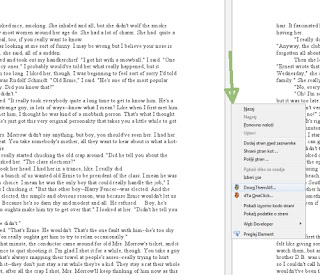
Got all the images to my local disk, so then just selected them all and print (now this is really good feature in Windows 7, congratulations MS).
Upload all file types to any Google Account
This feature allows developers to roll out their solutions to all Google Docs users. For instance, it’s now possible for developers to build applications that allow all users to back up files from their local hard drive to the cloud. There are a variety of other possible uses for this feature, and some examples include revision control and file distribution. Third-party applications (such as those on the Google Apps Marketplace) can also now use Google Docs as the primary place to store their data without the hassle of creating different solutions for customers of Google Apps for Business versus the free edition of Google Apps.
After they are uploaded, files are available in the Google Docs interface:

To enable uploads for all file types, developers must use the resumable upload feature of the API, and also pass in the
?convert=false URL parameter.We have also added checksums to all files that are not converted to a native Google Docs format. This means that if you upload a file type we cant convert, or if you choose not to convert a file to a native format, a checksum is now available to help guarantee the integrity of the file between storage and retrieval.
We are also in the process of adding checksums to all previously uploaded unconverted files. Due to the popularity of uploading unconverted files, processing this backlog will take some time to complete.
We’ve recently made a lot of improvements to the documentation that should make implementing all of this easier. For further help, please have a look in the forum.
Want to weigh in on this topic? Discuss on Buzz
A One Two Punch for Getting Even More out of Google Apps APIs
FlashPanel, a leading enterprise-grade security and management application for Google Apps, makes use of many Google Apps APIs. Each API comes with its own set of rate-limiting quotas, network traffic behavior and response conditions. The challenge we face is to provide our customers with a stable, consistent experience despite these API behavior differences. Fortunately, Google has provided two simple, yet powerful tools to greatly increase our success rate and reliability.
Controlling Throttle Rates with Guava’s RateLimiter
Google Apps APIs operate with quota rates per second or per day. As such, the FlashPanel development team’s objective is to minimize total operation time of a parallelized set of API-intensive processes while avoiding running into Google’s API quota limits. To accomplish this, we can very easily set up a thread-safe RateLimiter for a specific rate per second for each rate restricted API:
final RateLimiter driveApiRateLimiter = RateLimiter.create(QUOTA_RATE_PER_SECOND);
The Guava RateLimiter allows us to attempt to acquire a permit based on the configured rate per second, block until available, and then take it when available, allowing execution.
To use it within the context of a method, we simply reference the rate limiter before making the API call:
public Result performDriveApiCall(driveApiRateLimiter, otherParams){
        driveApiRateLimiter.acquire(); // blocks according to rate
// make API call...}This provides us with a very easy solution for rate limiting parallelized calls to the same APIs.
Reducing Impact of Network Traffic Issues Through Configured Backoffs
Occasionally, we experience additional network traffic issues despite enforcing rate limits. Google suggests that API clients use an exponential backoff strategy to handle this variety of error response. Typically this category of network issue resolves itself on its own after fractions of a second, but occasionally more time is needed. All we need to do to receive a successful API response is to simply retry the call some number of times, with the interval of time between retries growing exponentially.
Again, Google has made this easy through the Google HTTP Client for Java library’s ExponentialBackOff builder. This class allows us to configure the initial retry time interval, the exponential multiplier, the maximum total time to attempt to retry, and the maximum total time between retries. For example, we could configure a retry to span five minutes, growing with a factor of two, starting at a one second interval, and growing up to a maximum of one minute between retries. An API call with this configuration would retry with the following pattern in terms of seconds between retries:
1, 2, 4, 8, 16, 32, 60, 60, 60
If after this last retry, the API call still was not successful, the failed http response is returned. The code to configure such a strategy using the ExponentialBackOff.Builder reads as follows:
ExponentialBackOff backoff = new ExponentialBackOff.Builder()
    .setInitialIntervalMillis(ONE_SECOND)
    .setMultiplier(2.0)
    .setMaxIntervalMillis(ONE_MINUTE)
    .setMaxElapsedTimeMillis(FIVE_MINUTES)
    .build();
One potential “gotcha” that we’ve seen is if we accidentally slam a particular API with many simultaneous API calls. In this event, not only would each of these API calls fail, but they would also schedule their retry strategy to occur simultaneously. All subsequent retries would end up firing simultaneously, causing the API calls to continue to fail due to excess per second volumes. The ExponentialBackoff class accounts for this by including a randomization factor within our retry logic that allows us to have each simultaneous API call stagger at different intervals.
For example, using our previous backoff but now with randomization, one API call may retry with these intervals:
1.04, 1.9, 4.23, 7.8, etc.
While a second API call would retry with something like these intervals:
.98, 2.04, 4.1, 8.15, etc.
With this randomization, we avoid API call sequencing collision, mitigating our chances of encountering quota related errors. To simply add this type of randomization, we append to our builder:
builder.setRandomizationFactor(RANDOMIZATION_FACTOR);
Once we have our exponential backoff strategy configured, the Google HTTP Client for Java library allows us to instantiate and assign an HttpBackOffUnsuccessfulResponseHandler to an HttpRequest as part of the request’s initialization:
private HttpBackOffUnsuccessfulResponseHandler handler = new HttpBackOffUnsuccessfulResponseHandler(backoff);

public void initialize(HttpRequest request){
    request.setUnsuccessfulResponseHandler(handler);
}
Final Thoughts
By restricting our API calls using Google Guava’s easy-to-use RateLimiter, and by employing an exponential backoff strategy using the Google HTTP Client for Java library’s ExponentialBackOff, we are able to significantly reduce the amount of network traffic errors received by our Google Apps API calls, improving FlashPanel’s reliability and the overall user experience.
Steve is Senior Architect at BetterCloud, the makers of FlashPanel, the number one security and management application for Google Apps. Follow BetterCloud on Google+ at plus.google.com/+Bettercloud.
Posted by Greg Knoke, Googler
Using Google Document List APIs to build Memeo Connect for Google Docs

Google Documents List API https://docs.google.com/feeds/default/private/full?convert=false |
Google Data Objective-C client library** NSURL *uploadURL = [[mDocListFeed postLink] URL]; GDataQueryDocs *uploadQuery = [GDataQueryDocs queryWithFeedURL:uploadURL]; [uploadQuery setShouldConvertUpload:NO]; |
Google Data .NET client library string uploadURL = DocumentsListQuery.documentsBaseUri + "?convert=false"; docService.StreamSend(new Uri(uploadURL), fileStreamHandle, GDataRequestType.Insert, contentType, docTitle); |
Google Documents List API http://code.google.com/apis/documents/docs/3.0/developers_guide_protocol.html#ResumableUpload Resumable post link: resumable-create-media" type="application/atom+xml" href="https://docs.google.com/feeds/upload/create-session/default/private/full"/> Request: POST /feeds/upload/create-session/default/private/full HTTP/1.1 Host: docs.google.com GData-Version: 3.0 Authorization: Content-Length: 0 Content-Type: application/pdf Slug: MyTitle X-Upload-Content-Type: application/pdf X-Upload-Content-Length: 1234567 Resuming: POST Host: docs.google.com Content-Length: 100000 Content-Type: application/pdf Content-Range: bytes 0-99999/1234567 |
Google Data Objective-C client library** Resumable uploads are automatically enabled when switching to the uploadLink URL NSURL *uploadURL = [[mDocListFeed uploadLink] URL]; GDataQueryDocs * uploadQuery = [GDataQueryDocs queryWithFeedURL:uploadURL]; Pausing and resuming uploads is also made easy. [mUploadTicket pauseUpload]; [mUploadTicket resumeUpload]; |
Google Data .NET client library ResumableUploader resumableUploader = new ResumableUploader(); if (newFile) resumableUploader.Insert(authentication, docEntry); else if (partialFile) resumableUploader.Resume(authentication, resumeUri, httpMethod, fileStream, cotentType); else if (updateExistingFile) resumableUploader.Update(authentication, docEntry); |
NSURL *uploadURL = [[mDocListFeed postLink] URL]; GDataQueryDocs *uploadQuery = [GDataQueryDocs queryWithFeedURL:uploadURL]; [uploadQuery addCustomParameterWithName:@"convert" value:@"false"]; |
Tuesday, March 10, 2015
Advanced security for Google Drive for Work
Last month we announced Google Drive for Work, which includes advanced Drive auditing to give organizations control, security and visibility into how files are shared. This new security feature helps companies and IT managers protect confidential information and gain insights into how their employees work.
Drive audit helps IT admins view activity on documents, such as uploading and downloading files, renaming files, editing and commenting, and sharing with others. Filters make it easy to sort and find details like IP address, date range, document title and owner’s email address. To make advanced auditing reports easier to manage, admins can set up alerts for important events like files being shared outside the organization.
To help organizations derive even more value from Drive for Work, we’ve been working with partners to give you even more capabilities through the Drive Audit API:
- Backupify protects your Google Apps data through secure, automatic, daily backup allowing IT users to easily search and restore files with advanced administrative features, safeguarding your business from data loss caused by user errors, malicious deletions, hackers, and app errors. (website, blogpost)
- BetterCloud, through their flagship cloud management and security tool, FlashPanel, has enhanced their offering through the Audit API to provide additional controls and insight. (website, blogpost)
- CloudLock, who provides a pure-cloud Data Loss Prevention (DLP) solution for SaaS applications, has released a new version of CloudLock for Google Drive, leveraging the new Google Drive audit APIs, to enable large organizations to extend their enterprise security controls to the cloud. (website, blogpost)
- SkyHigh for Google Drive delivers Data Loss Prevention (DLP), mobile-to-cloud support, application auditing, data discovery, and anomaly detection without changing the Google Drive experience users love. (website, blogpost)
Google is committed to enabling organizations to be successful by leveraging a large community of ISVs. One of the areas we constantly invest in is our APIs, that allow customers and ISVs to extend the functionality of the Google Apps platform. If you’d like to join our ISV community, check out the developers.google.com site. For a list of ISVs supporting Google Apps, please visit the Google Apps Marketplace.
Google Sites API v1 2 Page Templates and Web Address Mappings
Web address mappings
Web address mappings are now programmatically accessible in the API using a new parameter on the site feed:
with-mappings=true. If you’re not familar with this feature in Google Sites, web address mappings enable users to point their own domains to a Google Site. For example, you can map the address http://www.mydomainsite.com to http://sites.google.com/a/domain.com/mysite. They’re a great way to fully customize a site.See our help center article for more information on web address mappings.
Page templates
A few months ago we launched site templates in the API, but there was no way to use page templates or access them programmatically. With the new page templates API, you can create templates as well as instantiate new pages from existing templates.
As an example usage, this Java snippet creates a new filecabinetpage from an existing template filecabinet:
FileCabinetPageEntry templateInstanceEntry = new FileCabinetPageEntry();
templateInstanceEntry.setTitle(
    new PlainTextConstruct("File cabinet template instance"));
templateInstanceEntry.addLink(new Link(SitesLink.Rel.TEMPLATE,
    Link.Type.ATOM,
    existingTemplateEntry.getSelfLink().getHref()));

String feedUrl = "https://sites.google.com/feeds/content/site/siteName";
FileCabinetPageEntry fileCabFromTemplate = client.insert(
    new URL(feedUrl), templateInstanceEntry);
Check out the documentation, updated Java guide, and changelog for further information.
Google Storage service for Developers
Using this RESTful API, developers can easily connect their applications to fast, reliable storage replicated across several US data centers. It is highly scalable - supporting read-after-write data consistency, objects of hundreds of gigabytes in size per request, and a domain-scoped namespace. In addition, developers can manage their storage from a web-based interface and use GSUtil, an open-source command-line tool and library.
Google Storage is designed for sharing and collaboration, with built-in authentication services and access controls based on Google Accounts. This makes it easy to control which users have access to what information in your internal and external applications. Right now Google Storage only supports standard Google Accounts, but we’re working hard to add support for Google Apps accounts.
We are introducing Google Storage for Developers to a limited number of developers at this time. During the preview, each developer will receive up to 100GB of data storage and 300GB monthly bandwidth at no charge. To learn more and sign up for the waiting list, please visit our website.
We’ll be demoing the service at Google I/O in our session and the Developer Sandbox. We’re looking forward to meeting those of you who are attending.
by Jessie Jiang, Google Storage for Developers Team
Visualize Your Data Charts in Google Apps Script!
Charts Ahoy!
Our initial launch includes six chart types. These can be attached to sites, sent as email attachments, or displayed using an Apps Script UiApp.


4 Easy Steps to Create Charts
Step 1 - Open Apps Script Editor
You can access the Apps Script Editor from a Spreadsheet or a Google Sites Page. To access the Apps Script Editor from a Spreadsheet, Open a New Spreadsheet > Tools > Script Editor. To open the Script Editor from a Google Sites, More > Manage Site > Apps Scripts > Add New Script.Step 2 - Create a Data Table
To build a chart, the first thing you need is a data table. The data table contains the data for the chart as well as labels for each category. In general, data tables contain one column of labels followed by one or more columns of data series, with some variations. Read the documentation for the type of chart you’re creating to learn the exact data table format it expects. Here’s an example of how you’d create a data table in Apps Script to use with a column chart:function doGet() {
// Populate the DataTable. Well have the data labels in
// the first column, "Quarter", and then add two data columns,
// for "Income" and "Expenses"
var dataTable = Charts.newDataTable()
.addColumn(Charts.ColumnType.STRING, "Quarter")
.addColumn(Charts.ColumnType.NUMBER, "Income")
.addColumn(Charts.ColumnType.NUMBER, "Expenses")
.addRow(["Q1", 50, 60])
.addRow(["Q2", 60, 55])
.addRow(["Q3", 70, 60])
.addRow(["Q4", 100, 50])
.build();In the example above, we’ve hard-coded the data. You can also populate the table in any of these ways:
- Fetch the data from an existing spreadsheet using
SpreadsheetApp - With data from a
UiAppform - Using our JDBC API
- Using
UrlFetch - Or any other way in which you can get an array of data using Apps Script.
Step 3 - Build a Chart using Data Table
Once you have the data table ready, you can start building the chart. Our top-level Charts class has Builders for each of the chart types we support. Each builder is configured for the specific chart you’re building, exposing only methods which are available for the specific chart type. For example, in a Line Chart you can make the angles smooth, in Bar and Column Charts you can stack up the data, and in Pie Charts you can make the whole chart 3D!Here’s an example of using the above data table to build a Column Chart:// Build the chart. Well make income green and expenses red
// for good presentation.
var chart = Charts.newColumnChart()
.setDataTable(dataTable)
.setColors(["green", "red"])
.setDimensions(600, 400)
.setXAxisTitle("Quarters")
.setYAxisTitle("$")
.setTitle("Income and Expenses per Quarter")
.build();
In the above chart, the only required methods are
setDataTable() and build(), all of the others are optional. If you don’t set colors and dimensions, for instance, we’ll pick some default values for you. Use the different setter methods to customize your chart, however and whenever you feel like it.Step 4 - Publish your chart in Documents, Email, Sites or UiApp
Once you’ve built your chart, there are different things you can do with it. For example, you can add it to an Apps Script UI. You can add a chart to any part of the UI that takes a widget, including the application itself. The following code snippet shows you how to publish a chart withUiApp.// Add our chart to the UI and return it so that we can publish
// this UI as a service and access it via a URL.
var ui = UiApp.createApplication();
ui.add(chart);
return ui;}
Charts can also be used as Blobs. This allows Charts to be attached to Sites pages, saved to your Docs List, or attached to outgoing emails. The code below does all three of these things:
// Save the chart to our Document List
var file = DocsList.createFile(chart);
file.rename("Income Chart");
file.addToFolder(DocsList.getFolder("Charts"));

// Attach the chart to the active sites page.
var page = SitesApp.getActivePage();
page.addHostedAttachment(chart, "Income Chart");

 // Attach the chart to an email.
MailApp.sendEmail(
    "recipient@example.com",
    "Income Chart",  // Subject
    "Heres the latest income chart", // Content
    {attachments: chart });
And that’s it. We hope you enjoy the new API. If your favorite chart is not here yet, or if you have ideas on how we could improve the API, please let us know in our forum. Finally, enjoy the income chart we’ve been building.

 | Gustavo Moura Gustavo has been a Software Engineer at Google since 2007. He has been part of the Google Docs team since 2009. Prior to that, he worked on AdWords. |
Want to weigh in on this topic? Discuss on Buzz
Google Developer Events Worldwide
Google Developer Days are scheduled for;
Sep 28: Tokyo, Japan
Oct 29: Sao Paulo, Brazil
Nov 9: Munich, Germany
Nov 12: Moscow, Russia
Nov 16: Prague, Czech Republic
We will hold technical sessions on mobile and web technologies including Android, Chrome, Google Web Toolkit, App Engine and more. It will also be an opportunity to meet both the Google team and other developers.
Google DevFests are smaller events focused on coding and workshops. Most recently we had a week long DevFest Australia June 28 - July 2, DevFest Israel June 29th, Manila July 6th, Singapore July 9th, and Kuala Lumpur July 16th.
Earlier this year there were DevFests in Pune and Hyderabad India, and Japan.
There are several DevFests currently scheduled and more in the planning stages.
September 30 - Madrid, Spain
November 2 - Buenos Aires, Argentina
Google Technical User Groups meet in many cities across the world. Check this directory to find a GTUG near you. Most groups meet once a month and are locally organized. Google Developer Advocates are at the meetings whenever they are in town. It is a great place to meet other developers and share ideas.
Google Blogs - Another way to stay in touch with Google technical updates are Google product blogs. Google Code Blog covers all products and links to many other product blogs. Here is a fairly complete list of blogs for products and APIs.
Meet the Google Apps Marketplace Team. This page introduces you to Google Developer Advocates and other people working on Google Apps. It includes our contact information so you can reach out to us directly with questions or opportunities. We will have pages like this for each Developer Advocate team in the near future. We are here to help. Let us know what we can do for you.
Monday, March 9, 2015
Control your Google Sites from Apps Script
// create a site, given the domain, site URL, site title and summary
var webpage = site.createWebPage("Jimmys Page", "JimmysPage", "Welcome to Jimmys site");
var annPage = site.createAnnouncementsPage("Team Announcements", "Announcements", "New announcements for the team will be posted here.");
site.createAnnouncement("Soccer Match #1", message, annPage);
Ryan Boyd
Building an Idea Bank using Google Apps Script
Editor’s Note: This is a guest post by Saqib Ali. Saqib is a Google Apps evangelist at Seagate. He has used Apps Script to create a number of applications that leverage Google Apps. His other interests include the curation of Lewis Carroll’s letter and translation of Urdu poetry to English. -- Ryan Boyd
What is an Idea Bank?
Idea Banks are repositories for innovative ideas that Seagate employees can submit, and others can vote on those ideas. Before Google Apps Script we had a custom built Idea Bank on the LAMP stack. With the release of the UI Services in the Google Apps Script, we wanted to port that Idea Bank to Google Apps to easily manage idea submissions in a Google Spreadsheet.
Designing the Idea Bank
A typical Idea Bank consists of three basic functions:
- Ability to submit and store ideas to a central database.
- Ability to vote on ideas.
- Ability to add description comment on ideas.
A traditional application would probably use a Relational Database like MySQL to store the ideas. However we found that using Google Spreadsheet to store the ideas provides two inherent benefits:
- Entered data can be easily managed using the Spreadsheet Editor;
- Revision history. Since Spreadsheet provides built-in revision history, we don’t have to create a system for tracking the changes to the submitted ideas.
The number of votes, and the voters are tracked using cells in the spreadsheet. For voters we used the Session.getUser().getEmail() to get the email address of the logged in user, and store them in the spreadsheet.
Since the Ideas Bank is embedded in a Google Site, we were able to simply use the Google Sites Page as a place holder to add description and comments to the ideas. Once the idea is submitted, a Google Sites page gets created corresponding to that idea from predefined template using the createPageFromTemplace() function. The submitter can then add detailed description in the template. Others can add comments to that Site pages.
Implementation Details
Using Spreadsheet Services to Manage Data
All the data is stored in a Google Spreadsheet, which makes it easy for the Idea Bank manager to manage (delete, remove, modify) the ideas using the Spreadsheets Editor.
Code snippet for adding new ideas to the spreadsheet:
var ss = SpreadsheetApp.openById("");  // Spreadsheet id goes here
SpreadsheetApp.setActiveSpreadsheet(ss);
ideas_sheet =  SpreadsheetApp.getActiveSpreadsheet().getSheetByName("Ideas");

var last_row = ideas_sheet.getLastRow();
var next_empty_row = last_row+1;

ideas_sheet.setActiveCell("A"+next_empty_row);
ideas_sheet.getActiveCell().setValue(e.parameter.ideadescription);
ideas_sheet.setActiveCell("B"+next_empty_row);
ideas_sheet.getActiveCell().setValue(Session.getActiveUser().getUserLoginId());
ideas_sheet.setActiveCell("E"+next_empty_row);
ideas_sheet.getActiveCell().setValue(Session.getActiveUser().getEmail());
Code snippet to read the ideas from the Spreadsheet and display them:
var ss = SpreadsheetApp.openById(""); // Spreadsheet id goes here
SpreadsheetApp.setActiveSpreadsheet(ss);
ideas_sheet =  SpreadsheetApp.getActiveSpreadsheet().getSheetByName("Ideas");

var last_row = ideas_sheet.getLastRow();
var last_column = ideas_sheet.getLastColumn();
var sheet_array = ideas_sheet.getRange(2, 1, last_row, last_column).getValues();

var submitIdeaButton = app.createButton("I have another idea");
var submitIdeaButtonHandler = app.createServerClickHandler(showSubmitIdeaDialog);
submitIdeaButton.addClickHandler(submitIdeaButtonHandler);
applyCSS(submitIdeaButton, _submitideabutton);

var ideaContents = app.createGrid().resize(last_row,3);
ideaContents.setId("ideacontents");
ideaContents.setWidth("100%");
ideaContents.setCellSpacing(0);
scrollPanel.add(ideaContents);
app.add(scrollPanel);

for (var row_i = 0; row_i < last_row-1; row_i++) {
  var ideaDescriptionLabel = app.createLabel(sheet_array[row_i][0]).setStyleAttribute("font","16px Sans-serif").setWordWrap(true);
  var submitter = sheet_array[row_i][1].split("@");
  var ideaAuthor = app.createLabel(submitter[0]).setStyleAttribute("font","10px Courier New, Courier, monospace").setStyleAttribute("color", "#CCC")
  ideaContents.setWidget(row_i, 0, app.createVerticalPanel().add(ideaDescriptionLabel).add(ideaAuthor)).setStyleAttribute("overflow","visible").setStyleAttribute("white-space","normal !important");

  //Button to display the voters
  var numberOfVotesForm = app.createFormPanel().setId(numofvotesform);
  var numberOfVotesFormContent = app.createVerticalPanel()
  numberOfVotesForm.add(numberOfVotesFormContent);
  numberOfVotesFormContent.add(app.createTextBox().setName(ideaID).setText(row_i + "").setVisible(false).setSize("0","0"));
  numberOfVotesFormContent.add(app.createTextBox().setName(voters).setText(sheet_array[row_i][4]).setVisible(false).setSize("0","0"));
  var numberOfVotesButton = app.createButton(countVotes(sheet_array[row_i][4]) + " vote(s)").setId("numberOfVotesButton"+row_i);
  applyCSS(numberOfVotesButton, _numofvotesbutton);
  var numberOfVotesButtonHandler = app.createServerClickHandler(showVotersDialog);
  numberOfVotesButtonHandler.addCallbackElement(numberOfVotesFormContent);
  numberOfVotesButton.addClickHandler(numberOfVotesButtonHandler);
  numberOfVotesFormContent.add(numberOfVotesButton);

  //Button to cast a vote
  var voteForm = app.createFormPanel().setId(voteform);
  var voteFormContent = app.createVerticalPanel();
  voteForm.add(voteFormContent);
  voteFormContent.add(app.createHidden(ideaID, row_i + "").setSize("0","0"))

  // Identify the function schedule as the server click handler
  var voteButton = app.createButton(I like this!).setId("voteButton"+row_i)
  var voteButtonHandler = app.createServerClickHandler(casteVote);
  voteButtonHandler.addCallbackElement(voteFormContent);
  voteButton.addClickHandler(voteButtonHandler);
  if (sheet_array[row_i][4].indexOf(Session.getActiveUser().getEmail())>-1)
    voteFormContent.add(voteButton.setText("Thanks!").setEnabled(false));
  else
    voteFormContent.add(voteButton);

  ideaContents.setWidget(row_i, 1, numberOfVotesForm);
  ideaContents.setWidget(row_i, 2, voteForm);
}
app.add(submitIdeaButton);
Using Ui Services to embed User Interface in Google Sites
Ui Service was used to build the front end for the app. UI Services are based on GWT, so it is a good idea to have a basic understanding of the GWT framework. The following were used in building this app:
- Horizontal panel to display each idea;
- Vertical panel to display the list of ideas;
- Simple button to cast votes and submit ideas;
- Form panel to accept new ideas.


A real live working example is available here. Full source code is available here.
But why Google Apps Script?
So why did I choose Google Apps Script? Well for one it is at no extra cost, comes with your Google Account, it is in the cloud (i.e. no servers required), integrates well with Google Sites and Spreadsheets, and most importantly it uses GWT UI widgets. Google Apps Script’s UI Services and the ability to easily integrate with any REST interface make Apps Script an easy choice.
 | Saqib Ali Saqib is a Google Apps evangelist at Seagate. He has used Apps Script to create a number of applications that leverage Google Apps. His other interests include the curation of Lewis Carroll’s letter and translation of Urdu poetry to English. |